When a campaign gets no replies, the usual cause is the list, not the wording. Choose who to email before you write a single line. This guide shows how to describe your buyer in one sentence, split that audience into segments that each get their own message, and build the list in Ken.
Start with who buys and why now
Answer two questions before you open Search.
Who buys? Look at your last 10 deals. Write down the title of the person who said yes, the industry, the company size and the country. The pattern is your starting audience. If you have no deals yet, start with the person who feels the problem every week and can approve a purchase.
Why now? Something makes the problem urgent this quarter instead of next year. That is a trigger. Common triggers, and where to find them in Search:
- The company raised money and has to grow fast. Use Funding.
- It is hiring for the team your product helps. Use Job posts.
- A new leader started in the last few months. Use the Changed Jobs or Years in Position filter on Profiles.
A trigger narrows your audience and gives you a reason to write today.
Write your audience in one sentence
Put the answers into one sentence:
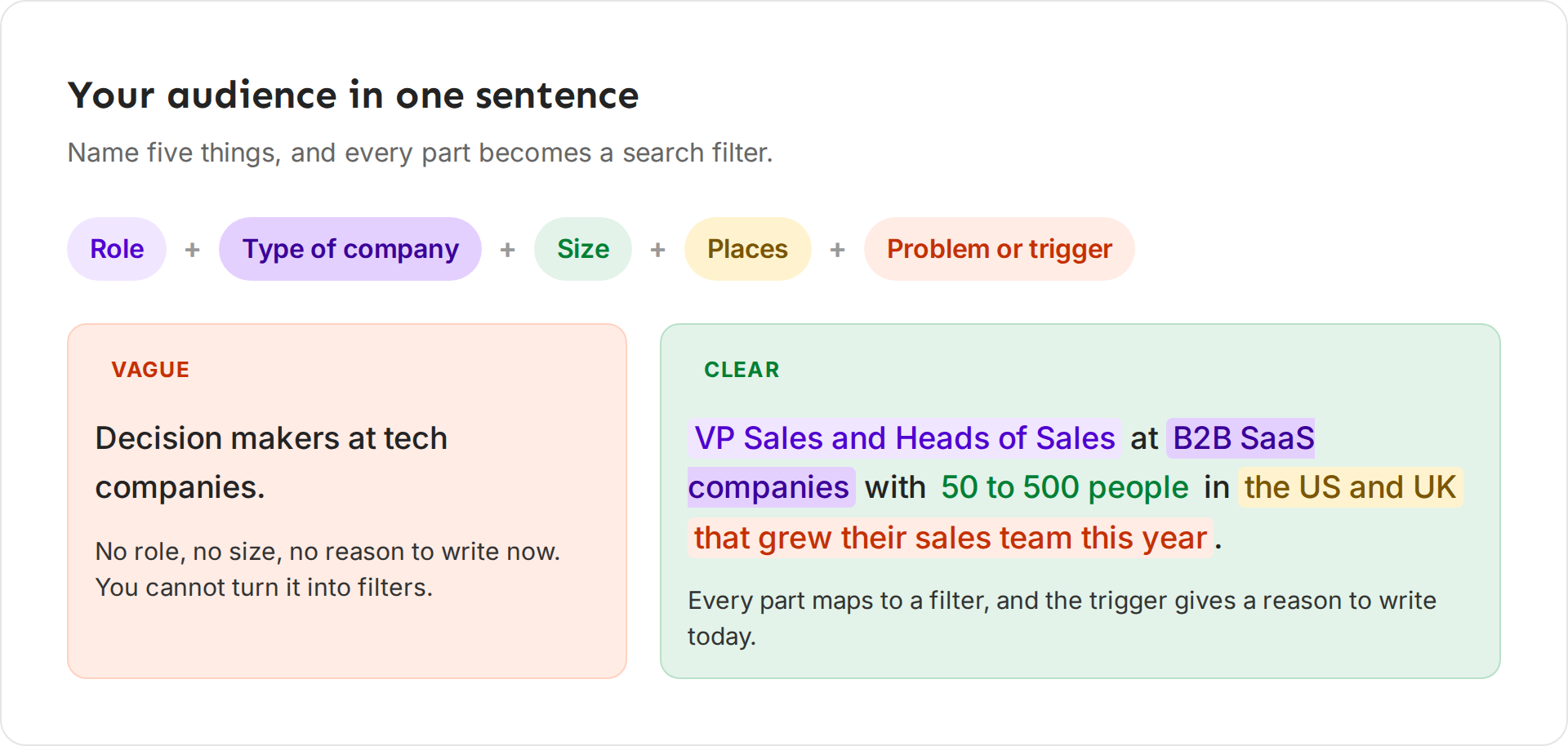
[Role] at [type of company] with [size] in [places], who [problem or trigger].
Pathline helps B2B software companies keep deals from slipping. It gets deals through security review and ramps new account executives faster, and it sells to sales and RevOps leaders. Here is a vague audience and a clear one for it:
- Vague: "Decision makers at tech companies."
- Clear: "VP Sales and Heads of Sales at B2B SaaS companies with 50 to 500 people in the US and UK that grew their sales team this year."
Test your sentence two ways. First, can you turn every part of it into a search filter? Second, would a person in that audience agree they have the problem? If either answer is no, rewrite it.
Split the audience into segments
A segment is a group inside your audience that shares a reason to buy, so it gets its own message. In Ken, each segment runs its own sequence, and the campaign's Analytics show results per segment.
You can split by:
- Industry. A healthcare company wants proof from healthcare.
- Role. A VP Sales cares about the number. A RevOps manager cares about clean data and fewer spreadsheets.
- Company size. A 50-person team and a 500-person team have different problems.
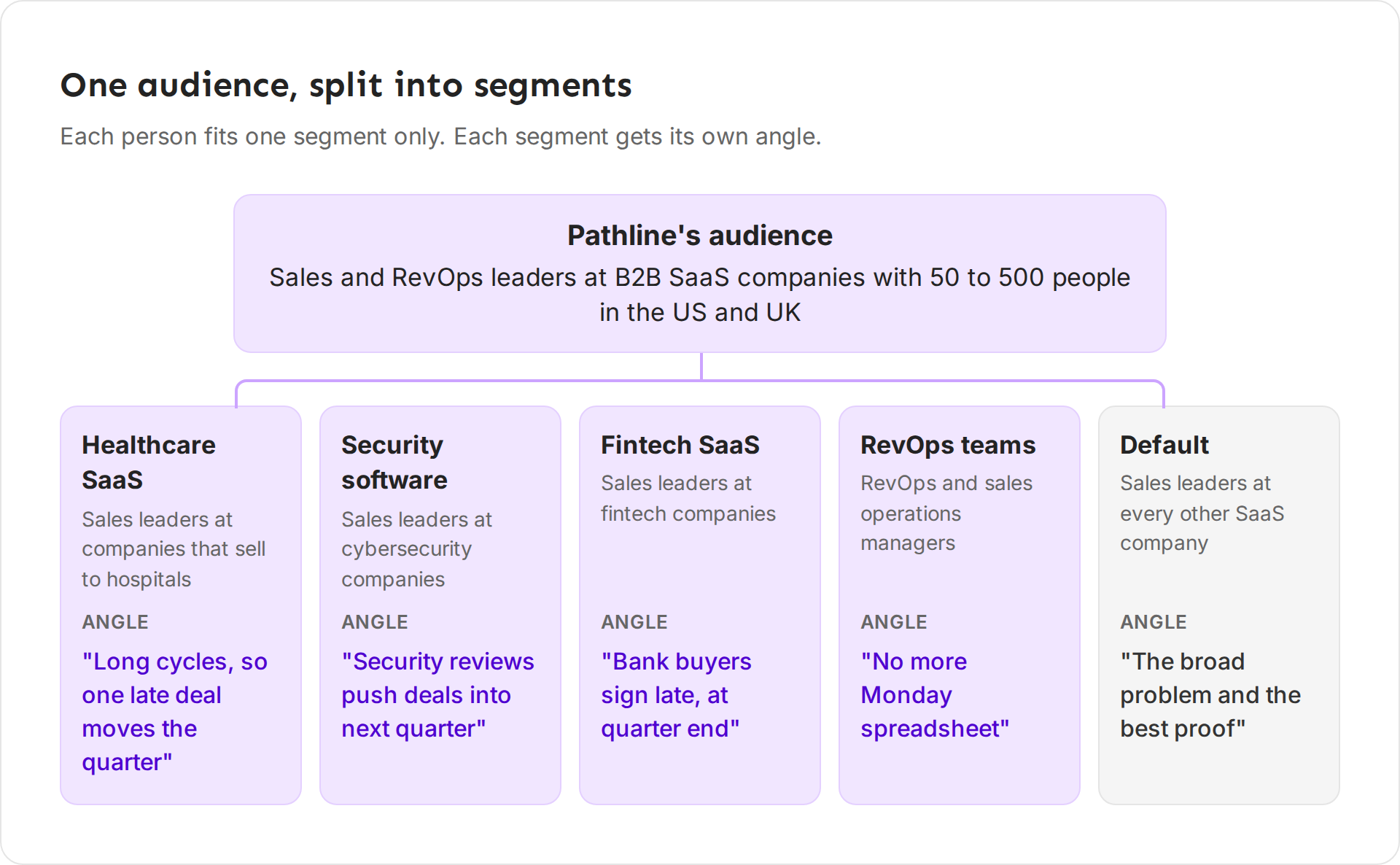
Pathline's full audience, without the trigger, is sales and RevOps leaders at B2B SaaS companies with 50 to 500 people in the US and UK. It splits that audience like this:
| Segment | Who is in it | Message angle |
|---|---|---|
| Healthcare SaaS | Sales leaders at companies that sell to hospitals | Long cycles, so one late deal moves the quarter |
| Security software | Sales leaders at cybersecurity companies | Security reviews push deals into next quarter |
| Fintech SaaS | Sales leaders at fintech companies | Bank buyers sign late, at quarter end |
| RevOps teams | RevOps and sales operations managers | Stop rebuilding the forecast every Monday |
| Default | Sales leaders at every other SaaS company | The broad problem and the best proof |
Rules that keep segments useful
- Three to five segments, plus Default. With more, each segment gets too small to learn from.
- One person, one segment. Make the rules exclusive. "Healthcare SaaS" and "Fintech SaaS" work. "SaaS" and "Healthcare SaaS" overlap, and everyone lands in one.
- Segments are different people, not different messages. To compare two messages for the same people, test two versions of a step instead. See Build a sequence.
- Keep a Default. People who fit your audience but no segment still get your broadest message. Write real copy for it.
- Name segments clearly. "Healthcare SaaS" and "RevOps teams" are easy to read in a report. "Segment 2" is not.
How big each segment should be
Reply rates in cold email are usually under 2%, so small groups tell you very little. Ken's team plans with these numbers:
- The whole audience should hold at least 5,000 people. If your market is a few hundred companies, work them one to one in Accounts instead. See Choose between Accounts and Campaigns.
- Search for about five times the people you want to email. Some have no valid email, and some fail the checks Ken runs before sending.
- A segment needs about 2,000 contacts before you compare two versions of an email. Below that, the difference is mostly luck.
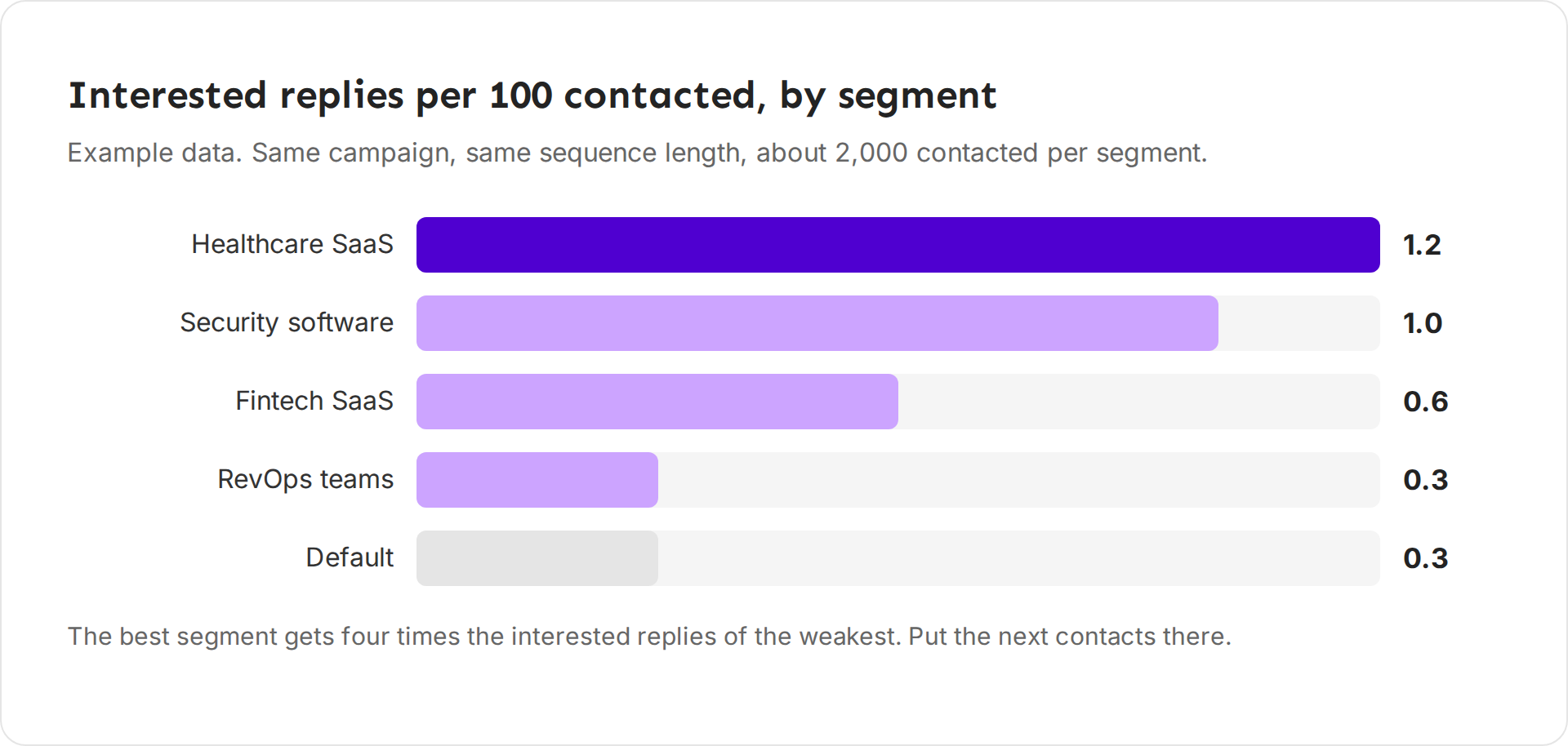
Segments rarely perform the same. In one campaign Ken ran, the best segments got about four times the interested replies of the weakest, for the same number of contacts. That is why you split. The numbers tell you where to put the next 5,000 contacts.
What to leave out
- Your customers, open deals, competitors and partners. Add their domains to the Blocklist in Settings before you launch. Ken never emails anyone on it. See Keep companies and people off your lists.
- Companies you work one to one. You don't need to remove them. Every campaign skips people in an active account play and people who replied in the last 90 days. By default it also skips everyone at an account marked Warming, Engaged or Meeting booked.
- Titles that are too junior or too senior. An intern cannot buy. The CEO of a 5,000-person company will not read a cold email about a team tool.
- Places you cannot serve. If you cannot sell or support a country, leave it out.
- Lists of unknown quality. A bought or old CSV bounces. In one campaign Ken checked, only 73% of an old CSV's emails were safe to send, against 97% for a list built in Search. High bounces hurt every inbox you send from.
Build the audience in Ken
-
Open Search, or press G then F. Pick Profiles to find people.
-
Type your one-sentence audience into the box, such as "VP Sales at SaaS companies with 50 to 500 people", and click Fill filters. Ken turns it into filters.
-
Check the filters under Company Filters and Person Filters. On filters that allow it, click a chip to exclude it, and click again to include it.
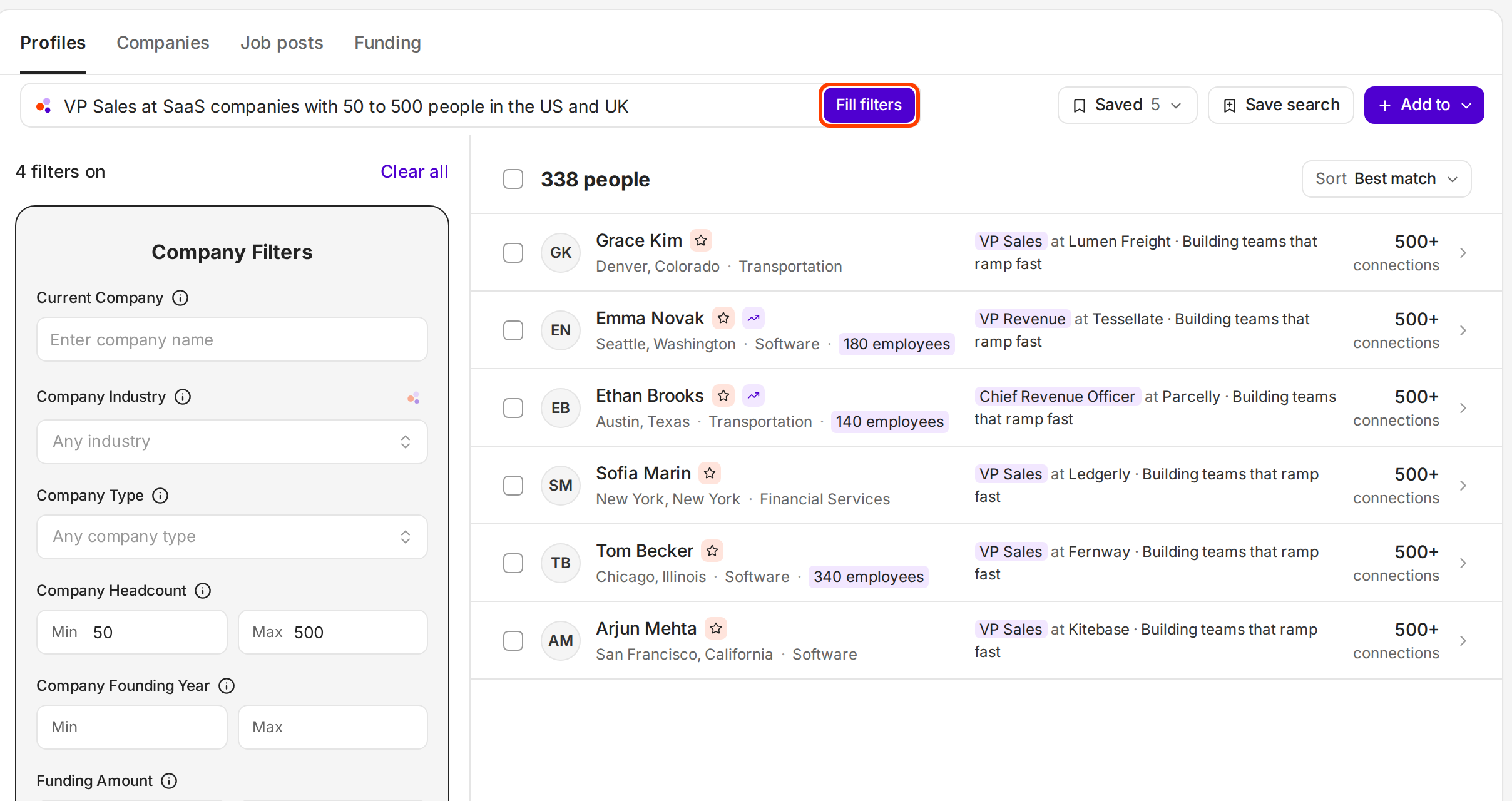
Fill filters turns your sentence into filters you can check and change. -
Click Save search so you can run it again later. See Save a search and reuse it.
-
Click Add to, then New campaign from this search.
To use a list you already have, pick Import contacts as the audience when you create the campaign. See Build a lead list that books meetings.
Choose how to split
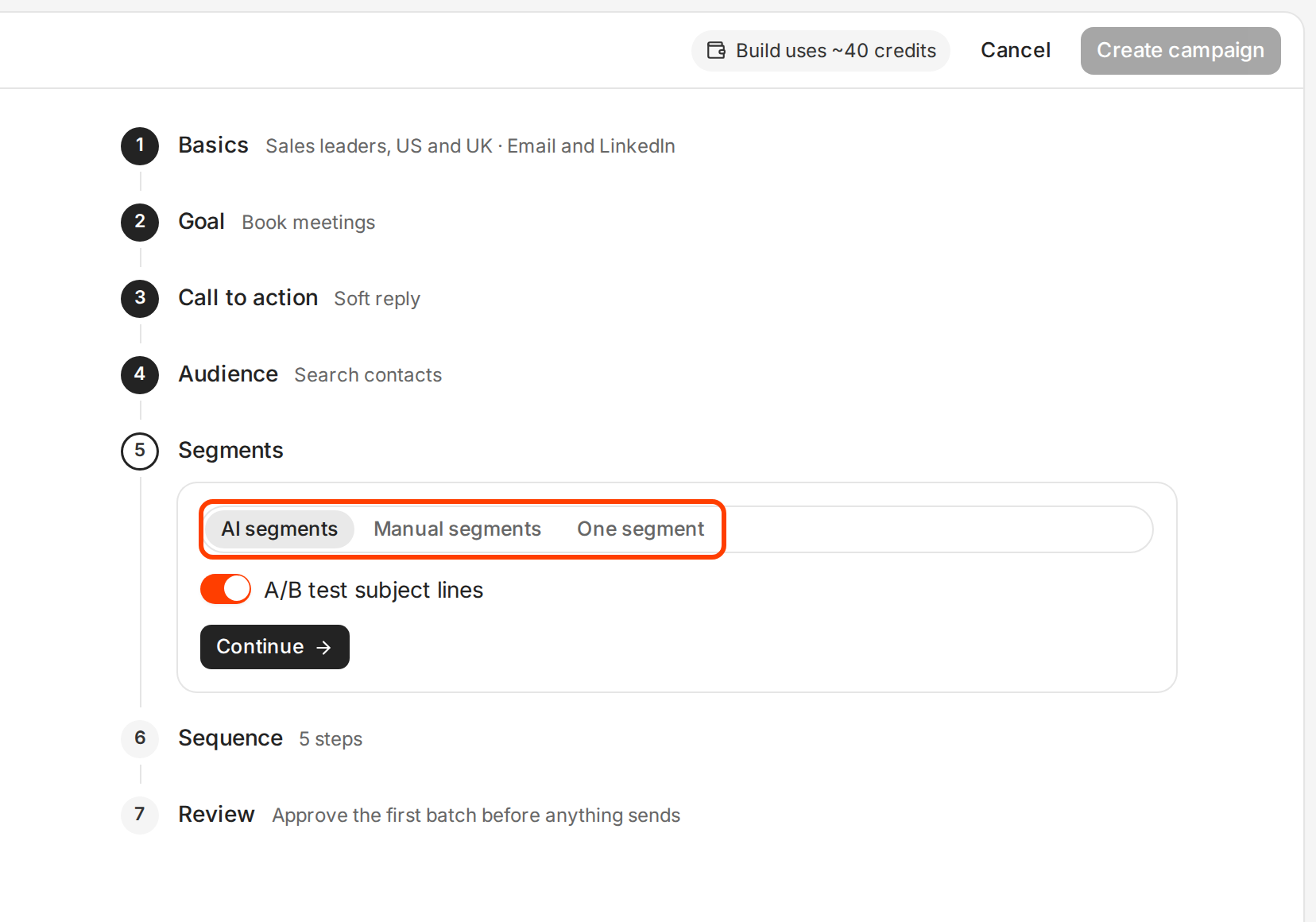
The campaign builder's Segments step gives three choices:
- AI segments. Ken groups leads by the problem they most likely have, names each segment in plain words, and writes an opening line for each. Use it when filters cannot see the split, such as "sells a product" versus "sells services", or when industry labels are messy.
- Manual segments. Ken splits by rules. The builder starts with two size segments, "50 to 200 people" and "200+ people". Use it when a simple rule describes the split. It is exact and easy to explain.
- One segment. Everyone gets the same sequence. Use it for a small first test, or when your audience really has one problem.
After you create the campaign, its Workflow tab shows the split as a step. Open it to rename or add segments. On a Manual segments step, leads that match no rule are skipped. Set Leads that match none to Put in Other to give them your broadest sequence instead.
If something goes wrong
- "Everyone landed in one segment." Two rules overlap, or one filter is too broad. Make the rules exclusive and rename segments so they cannot be confused.
- "Most leads ended up in Default." The segment rules match almost nobody. Check the rules against real titles and industries in your list.
- "My list shrank after Ken checked the emails." That is normal. Plan for about five times the people you want to email.
- "Replies say we're not a fit." The audience is off, not the copy. Fix the filters before you rewrite the emails.
- "Search found 200,000 people." Add a trigger or narrow the company size. A smaller, sharper list gets more replies.
Next: Write cold emails people reply to, Build a lead list that books meetings or Find people and companies with Search.