A cold email gets a reply when a stranger can read it in 20 seconds, sees their own problem in it, and can answer yes or no. This guide covers the parts of a first email, length and tone, subject lines and follow-ups, with before and after examples. The last section shows how to teach Ken to write the same way.
The five parts of a first email
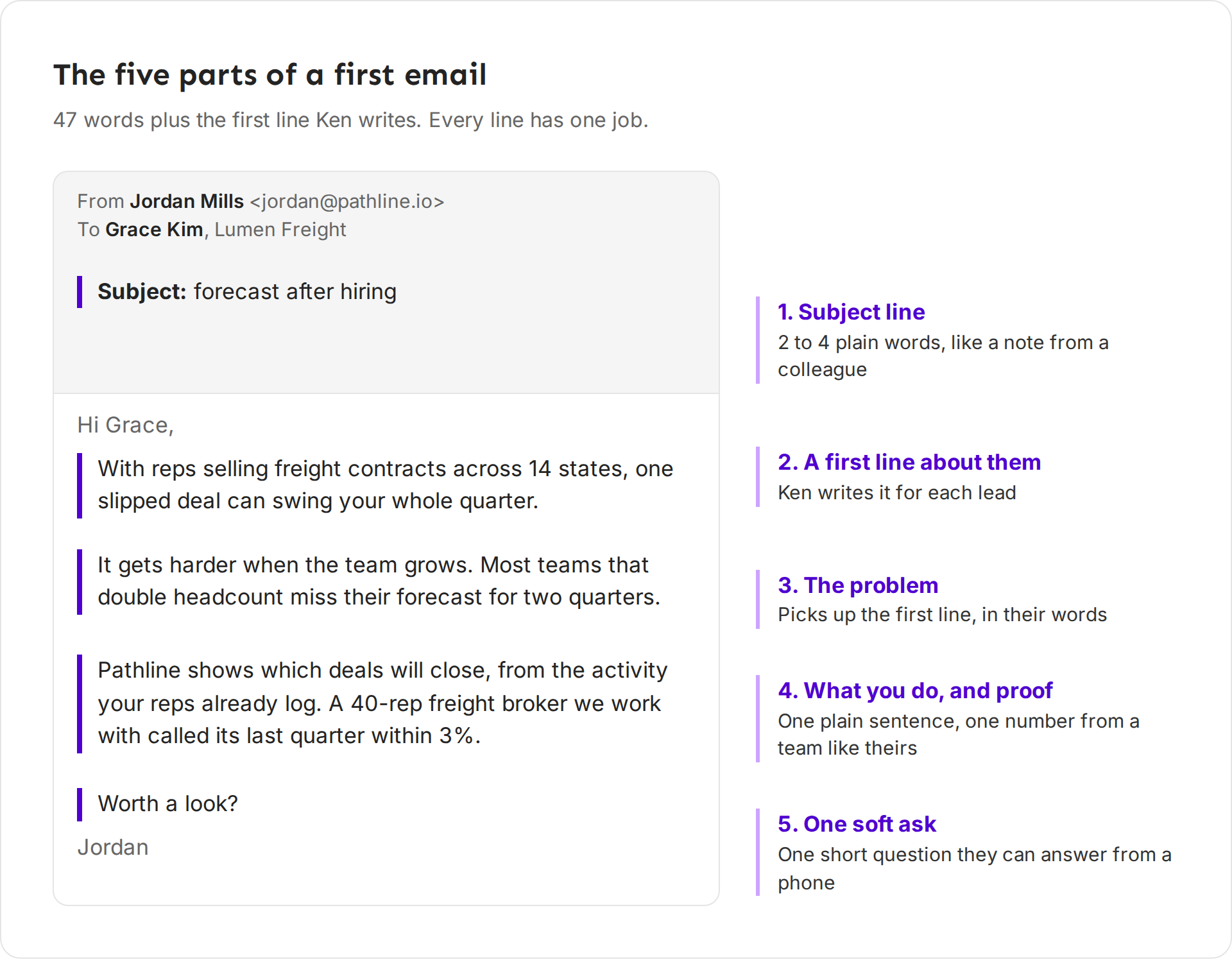
- Subject line. Two to four plain words, like a note from a colleague. Write it in lowercase, except names. For example "forecast after hiring".
- A first line about them. One sentence about their business, not about you. This is usually an AI variable,
{{First Line}}, that Ken writes for each lead. See Personalize emails with AI variables. - The problem. One or two sentences that name a problem people in their role have, in the words they would use. Pick up where the first line left off.
- What you do, and proof. One plain sentence on what you do, then one number from a team like theirs. "A 40-rep freight broker we work with called its last quarter within 3%" beats "we are the leading platform".
- One soft ask. End with one short, low-pressure question they can answer from a phone, such as "Worth a look?" Or offer something free and useful, such as "Want me to send the one-page ramp benchmark?" Don't ask for a meeting, a call or a time slot. The meeting comes after they reply.
Here is the whole email:
- Subject: forecast after hiring
- Body: "Hi Grace, With reps selling freight contracts across 14 states, one slipped deal can swing your whole quarter. It gets harder when the team grows. Most teams that double headcount miss their forecast for two quarters. Pathline shows which deals will close, from the activity your reps already log. A 40-rep freight broker we work with called its last quarter within 3%. Worth a look? Jordan"
That is 47 words, not counting the greeting, the signature and the first line Ken writes. Each sentence leads to Grace's problem or its fix.
The campaign builder works the same way. Its Call to action step starts on Soft reply, so keep it for cold email. Hard reply goes straight for a meeting.
Length and tone
Keep the first email under 80 words of fixed text, not counting the greeting, the signature and the AI first line. Keep follow-ups under 55. In the sequences Ken's team runs for clients, the median first email is 79 words, so 80 is a limit you can meet.
Write like a peer who knows their world, not like a vendor:
- Short words and short sentences. Your reader may skim on a phone, or in a second language.
- Contractions ("you're", "it's"). They sound like a person.
- No buzzwords. If a word would fit on any company's homepage, replace it with what you actually do.
- Read it out loud. If you would not say it to a person at a conference, rewrite it.
What to leave out
- Links. Keep the first email free of links. Links and tracking make a cold email look like marketing and can hurt delivery. If you need one, put it in the second or third email.
- Images and attachments. Leave them out of every cold email.
- A long intro about you. "My name is Jordan and I work at Pathline, a leading..." Your signature already says who you are.
- Filler openers. "I hope this email finds you well", "I came across your profile", "Quick question".
- More than one ask. One email, one question.
- Open tracking. Ken leaves it off by default because open tracking hurts deliverability. Judge emails by replies.
Before and after
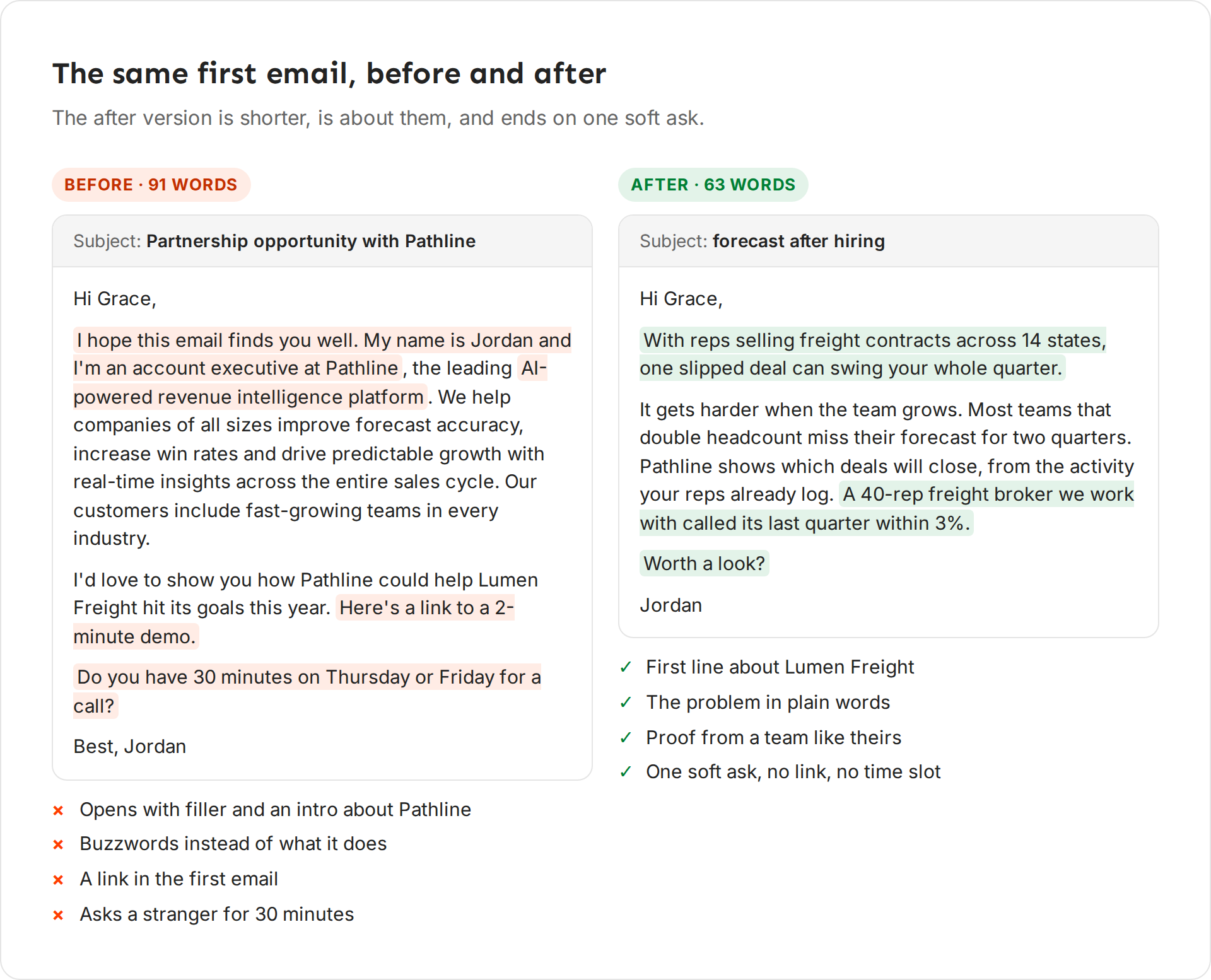
Before (91 words without the greeting and signature), with the subject "Partnership opportunity with Pathline": "Hi Grace, I hope this email finds you well. My name is Jordan and I'm an account executive at Pathline, the leading AI-powered revenue intelligence platform. We help companies of all sizes improve forecast accuracy, increase win rates and drive predictable growth with real-time insights across the entire sales cycle. Our customers include fast-growing teams in every industry. I'd love to show you how Pathline could help Lumen Freight hit its goals this year. Here's a link to a 2-minute demo. Do you have 30 minutes on Thursday or Friday for a call? Best, Jordan"
After (63 words with the first line) is the email from "The five parts of a first email" above, with the subject "forecast after hiring".
What changed:
- The opener is about Grace's business, not about Jordan.
- "AI-powered revenue intelligence platform" became what Pathline does, in one plain sentence.
- Proof from a team like Lumen Freight replaced three vague claims.
- The link is gone.
- "30 minutes on Thursday or Friday" became "Worth a look?", which Grace can answer from her phone in one word. The call comes after she replies.
Subject lines
| Weak | Better | Why |
|---|---|---|
| Quick question | forecast after hiring | Says what the email is about |
| Partnership opportunity with Pathline | forecast at Lumen | About them, not you |
| Re: our call | Lumen's forecast | A fake "Re:" breaks trust before they open it |
| Increase Your Forecast Accuracy By 40%! | missed forecast | Plain and lowercase, like an internal email. Numbers, $ and % in a subject look like an ad |
Follow-ups
Per email sent, the first email gets the most replies. In one campaign Ken ran, it got about twice the reply rate of each follow-up. Follow-ups still catch people who were busy, so send two or three.
- Wait three or four days between steps.
- Bring something new each time. A different angle, a new proof point or something free and useful, and end on one soft ask. Never "just following up" or "circling back".
- Get shorter. Each follow-up is shorter than the one before.
- Use a new opener. Using
{{First Line}}again sends the same sentence twice. Make a second AI variable for later emails, or write the follow-up without one. - Skip the guilt trip. A last email that says "this is my last email" or "should I close your file" does worse than one more useful idea.
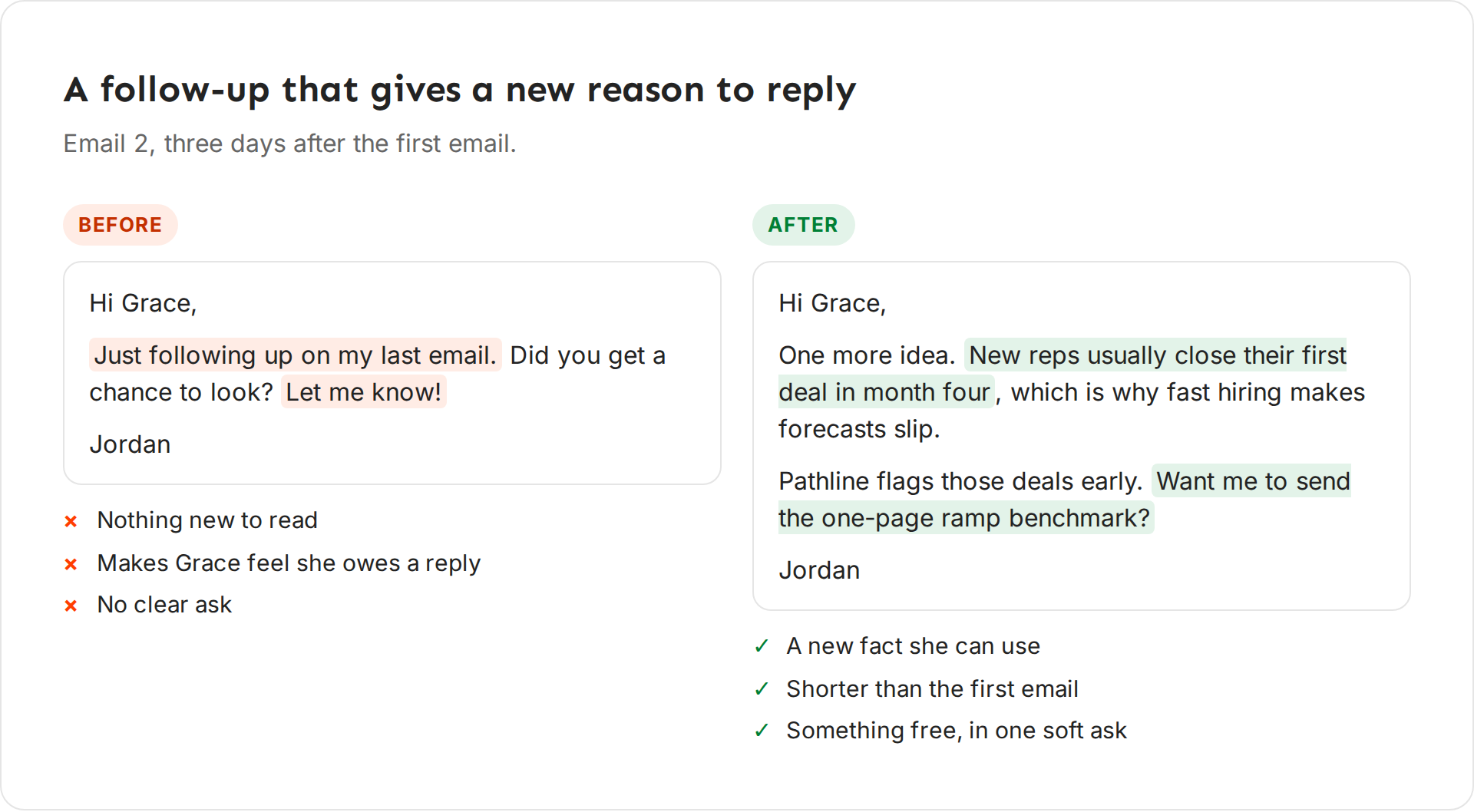
Before: "Hi Grace, just following up on my last email. Did you get a chance to look? Let me know! Jordan"
After: "Hi Grace, one more idea. New reps usually close their first deal in month four, which is why fast hiring makes forecasts slip. Pathline flags those deals early. Want me to send the one-page ramp benchmark? Jordan"
The before version gives Grace nothing new to read and makes her feel she owes a reply. The after version gives her a fact she can use and offers something free, in one question she can answer from her phone.
Get Ken to write this way
Ken drafts emails, LinkedIn messages and replies for you. Three places shape what it writes.
Writing rules
-
Open Knowledge, or press G then K.
-
Under Playbook, click Writing rules.
-
Type a rule in the box at the bottom of the list, such as "Never open with a compliment", and press ↵.
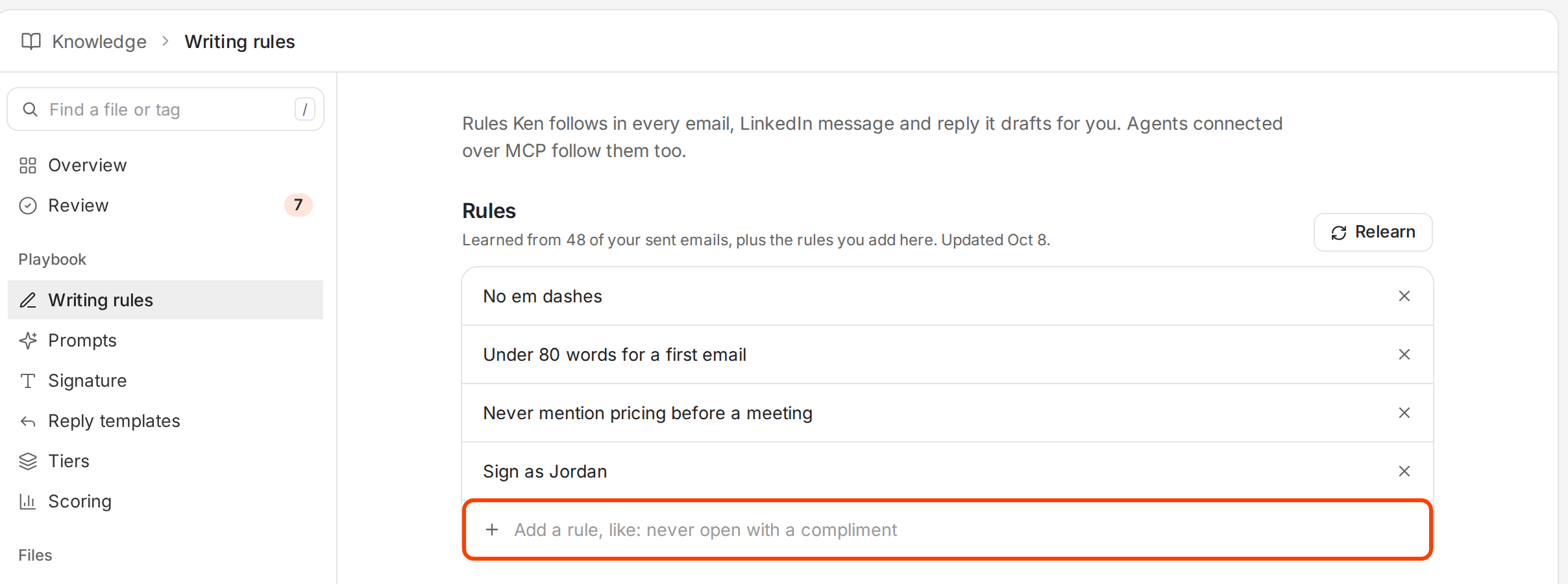
Ken follows these rules in every email, LinkedIn message and reply it drafts.
Good rules are short and testable, such as "Under 80 words for a first email", "No links in the first email" and "Never mention pricing before a meeting". Ken also learns your style from your sent emails. Click Relearn to learn again from your newest ones. New rules it finds wait for you in Review. See Teach Ken how you write.
Get feedback
In a campaign's Sequence tab, click Get feedback under the email editor. Ken grades the email you are editing on checks such as a quick read, whether it sounds like a person, whether the ask is an easy yes or no, and whether you would reply to it. Fix the lines it flags, then click Save.
Review a batch
When Ken drafts a batch of emails for you to approve, read the samples. If they are right, click Approve. If they share a mistake, fix the cause first. It is usually the email in the Sequence tab, a writing rule, or an AI variable's prompt. Then click Send back to Ken, and Ken rewrites the batch and asks you again. See Approve outreach before it sends.
If something goes wrong
- "I get opens but no replies." Ken leaves open tracking off by default because it hurts deliverability, so judge the email by replies. If people do not reply, the problem is usually the offer or the audience, not the wording. See Fix a campaign that isn't getting replies.
- "Replies say 'not interested' or 'unsubscribe'." The email reached the wrong people, or it sounds like an ad. Check the audience first, then cut buzzwords and the long intro.
- "Ken's drafts sound stiff." Add writing rules for what you dislike. Click Relearn so Ken learns from your sent emails, then check the new rules in Review.
- "My follow-ups repeat the first email." Each follow-up uses the same
{{First Line}}. Give later steps their own opener or none.
Next: Personalize emails with AI variables, Build a sequence or Teach Ken how you write.