Ken gives you two ways to sell. Accounts is for a short list of companies you work one to one, and Campaigns is for reaching many people with one offer. This guide helps you decide which fits each part of your market, and shows how most teams use both.
The short answer
Start with two questions about the deal and the market.
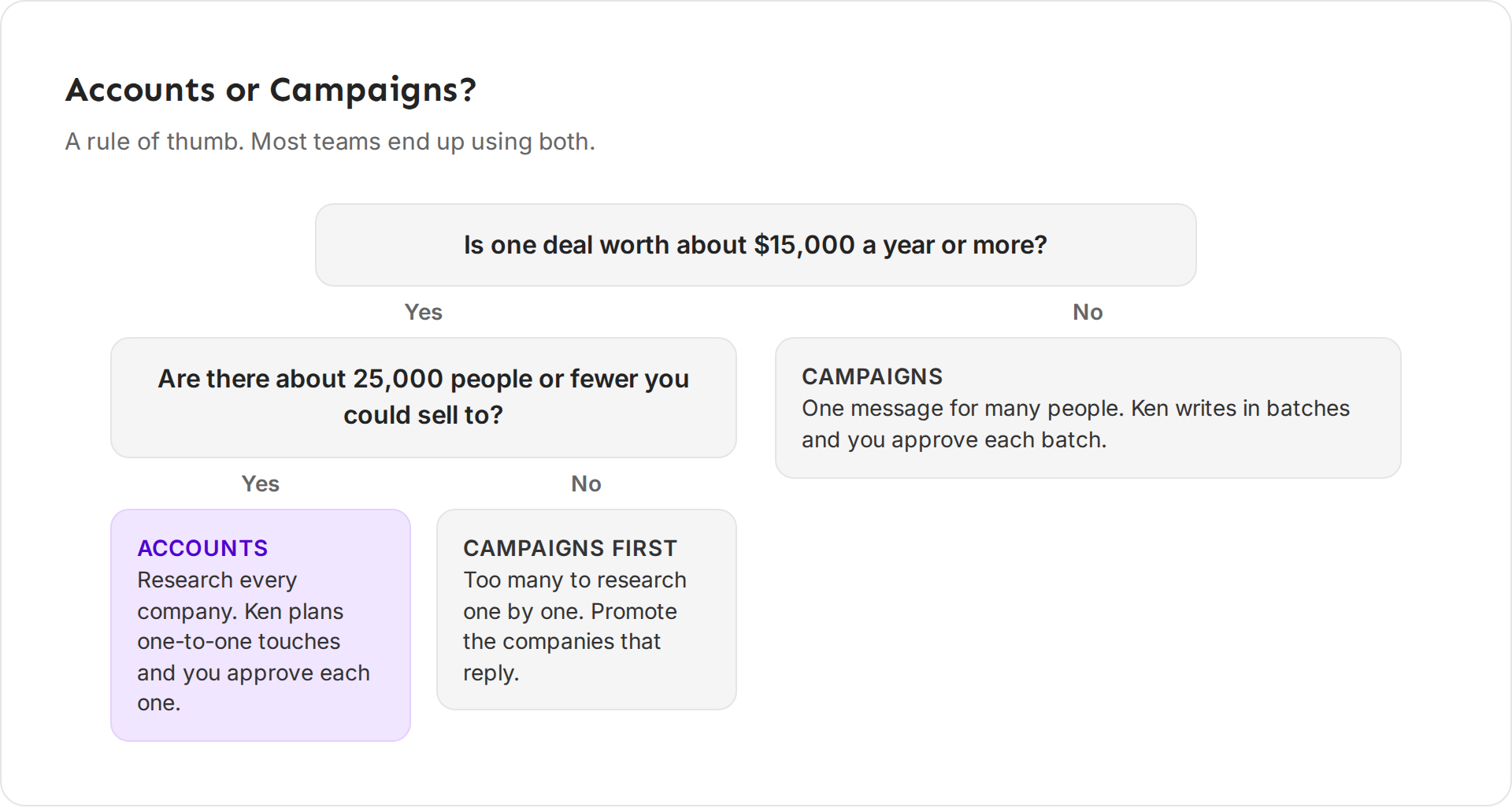
- Is one deal worth about $15,000 a year or more? If not, use Campaigns. A small deal can't pay for deep research on every company.
- Are there about 25,000 people or fewer you could sell to? If yes, use Accounts. Ken can research every company and plan each touch. If there are more, start with Campaigns and move the companies that reply into Accounts.
This is a rule of thumb, not a law. Most teams end up using both.
How the two compare
| Accounts | Campaigns | |
|---|---|---|
| Best for | A short list of companies worth a lot to you | Many people who share one problem |
| Research | A brief, signals and a buying committee for each company | A shared audience, split into segments |
| Writing | Each touch is written for one person | One sequence per segment, with personal lines |
| Sends from | The account owner's inbox and LinkedIn, by default | Inboxes on separate sending domains |
| You approve | Every touch | Each batch, after Ken shows you samples |
| Pace | For a top account, about 9 touches over 90 days | A sequence over a few weeks |
| Success means | Engaged accounts and meetings per 100 accounts | Replies and meetings per 10,000 people |
Accounts also costs more per company. Ken spends about 18 credits to research one account and find its buying committee, because it does real work on every company.
Four questions to decide
How big is the deal? Research pays off when one deal is worth a lot. If you would happily spend an hour preparing for a call with this company, it belongs in Accounts.
How many people could buy? If your whole market fits in a spreadsheet you can read, work it one to one. If it runs to tens of thousands, a campaign is the only way to reach it. Our team plans a campaign only when the audience has at least 5,000 contacts. If yours is smaller, broaden it or combine it with a similar audience.
How much does each person need to hear? A buyer who signs a $50,000 contract wants proof that you understand their business. A buyer of a $200 tool wants a clear offer and an easy yes.
Who sends? Accounts sends from the inbox and LinkedIn of the person who owns the account, usually a founder or an account executive. Campaigns sends from a pool of inboxes on domains you keep for outreach, so one person can run it for the whole team.
Two examples
These examples use Pathline, a company in Ken's sample data. Pathline helps B2B software companies get deals through security review and ramp new account executives faster. The numbers are made up.
Example 1: Accounts for the big deals
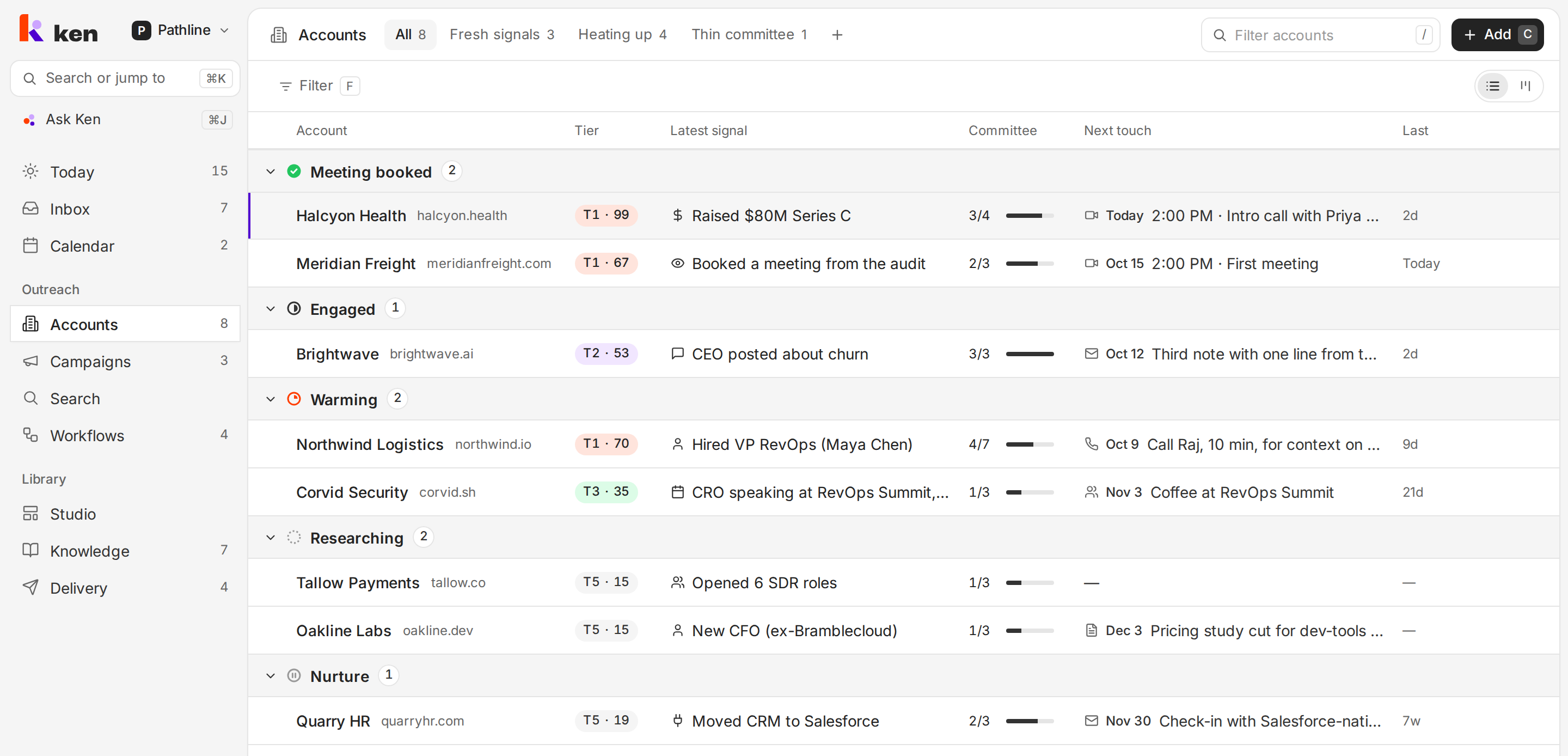
Pathline's mid-market deals are worth about $30,000 a year. About 1,500 software companies fit its best profile, so Jordan Mills, an account executive, adds the 25 that show the clearest signals.
One of them is Halcyon Health, which just raised a Series C. Ken writes a brief on why to reach out now, maps the buying committee and plans a first touch to Priya Nair, the CRO. Jordan reads it, adds one line about a mutual customer and approves it. The email sends from Jordan's own inbox.
Example 2: A campaign for the smaller plan
Pathline also sells a smaller plan for teams of 11 to 50 people, at about $4,000 a year. Thousands of companies fit, and each deal is too small to research by hand.
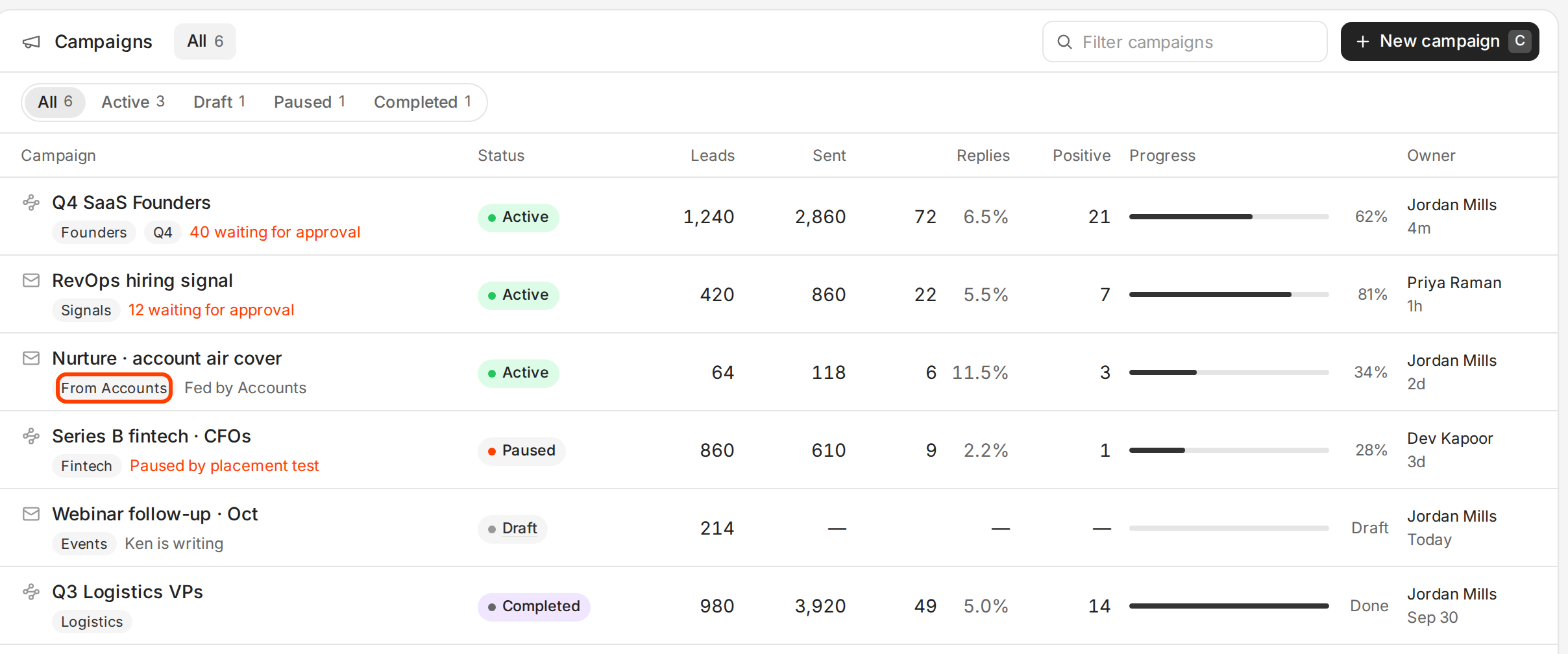
Jordan's teammate builds one campaign. Ken splits the audience into segments by the problem each company most likely has, writes a 3-step sequence and sends it from inboxes on Pathline's sending domains. When the head of sales at a fast-growing company replies and asks about the bigger plan, the teammate promotes that company to Accounts so Jordan can work it one to one.
How the two connect
People move between Accounts and Campaigns, and Ken stops anyone from getting both at once.
From a campaign to Accounts
When a company in a campaign shows real interest, promote it.
- Open the reply in Inbox. Or go to the campaign's Leads tab and select the leads, or open one lead.
- Click Promote to Accounts.
- Under Start at, pick the stage: Researching, Warming or Engaged. Warming is picked for you.
- Click Promote.
The company leaves bulk email and becomes an account you work one to one. The sequence stops for everyone at the company. Ken researches the company, maps its buying committee and drafts the next touch for you to approve.
From Accounts to a campaign
Some people at an account don't need a personal touch yet. You can add them to a campaign.
- In Accounts, right-click the account.
- Click Add people to a campaign.
- Pick the campaign and click Add to campaign.
Ken adds only the people with no one-to-one touch planned. Anyone you are working one to one stays out, and the campaign stops if anyone at the account replies.
Campaigns skip the people you work one to one
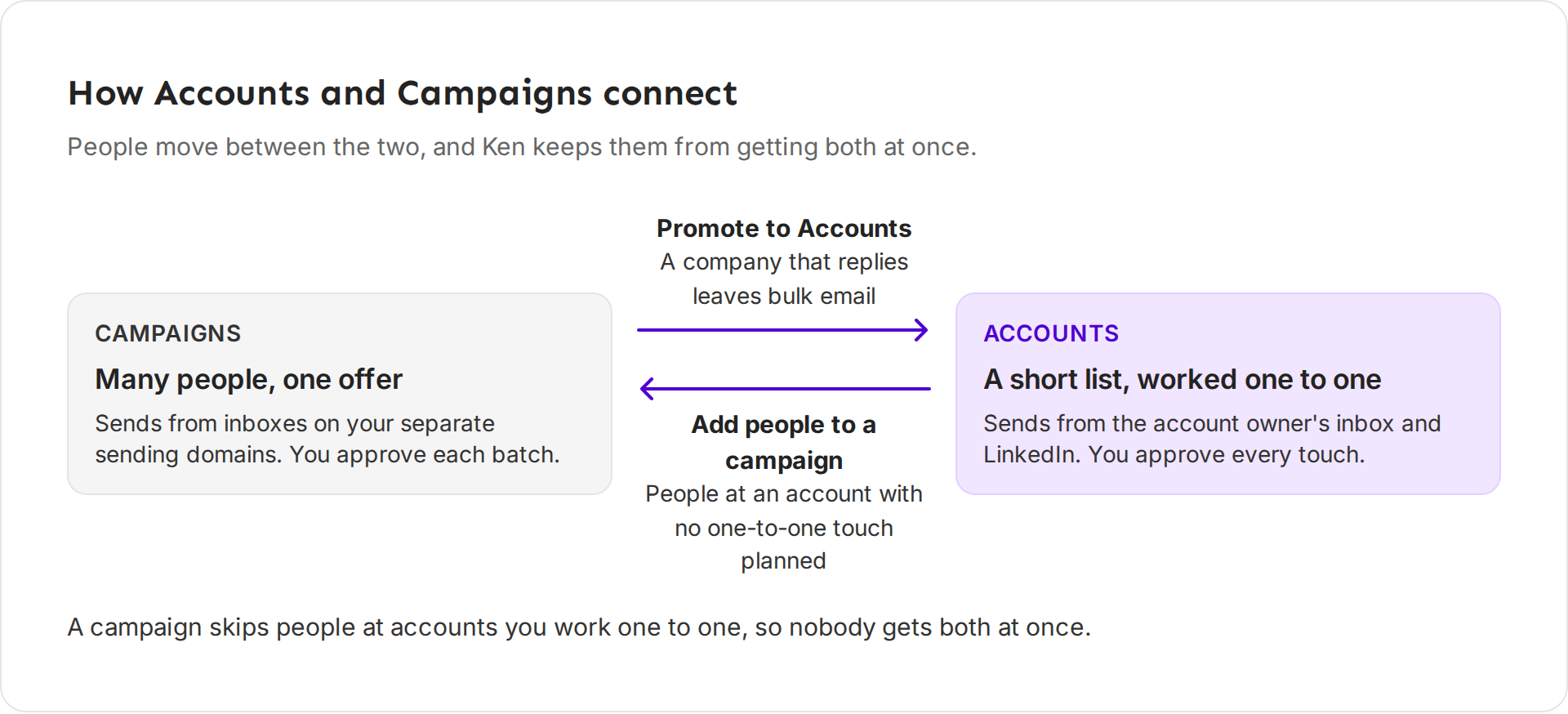
Every campaign has a stop rule called Protect account plays. It skips anyone at an account you work one to one, and stops the campaign for a company that moves to Warming. Leave it on. Two more stop rules sit next to it: Stop when the lead replies and Stop for the whole company when anyone replies.
How to split the work
Most teams use both. Here is a split that works.
- Give each one an owner. The people who close deals own Accounts, because the touches send from their inbox. One person can run Campaigns for the whole team.
- Fill Accounts first. Add your best companies to Accounts before you build a campaign. Campaigns then skip them on their own.
- Promote every week. Once a week, go through the interested replies in Inbox and promote the companies worth a closer look.
- Park quiet accounts in Nurture. When an account goes quiet, move it to Nurture instead of dropping it. In the campaign builder, the audience From Accounts is for the people at accounts in Nurture.
- Keep Accounts short. Ken plans a top account's touches over about 90 days. If you can't approve a few touches a day, the list is too long.
If something goes wrong
- The campaign builder suggests Accounts. You described fewer than 25 companies. For a list that short, Ken suggests Accounts, where it researches each company and you approve every touch. Click Add them as accounts to follow the suggestion.
- You can't find Promote to Accounts. It is not on for your workspace yet. Write to [email protected] to ask for it.
- Someone you work one to one got a campaign email. Open the campaign, go to Settings and check that Protect account plays is on under Stop rules.
- A promoted company is still getting campaign email. Promoting stops the sequence for everyone at the company. If someone there still gets campaign email, write to [email protected] with the company name and the campaign.
Next: Create your workspace, Choose the right target accounts or Launch your first campaign.