The list decides more of your results than the email does. A great email to the wrong person gets no reply, and a plain email to the right person often does. This guide shows how Ken's team builds lists. Start from the buyer and set the few filters that matter. Size the search to what your inboxes can send. Keep out the people you should not email, and check a sample before anyone gets a message.
Start from the buyer, not the filters
Before you open Search, write one sentence about who buys and why now:
Heads of Sales at US software companies with 50 to 500 people, who are hiring SDRs.
This example is for Pathline, which helps B2B software companies get deals through security review and ramp new account executives faster. It targets the ramp side. The sentence names three things:
- The role that feels the problem and can say yes. Here, the person who has to ramp new reps.
- The company where that problem is real. Here, software companies big enough to have a sales team and small enough to lack a big enablement team.
- The reason to talk now. Here, open SDR roles. A signal like hiring, a new round of funding or a new leader turns a fine list into a timely one.
If you sell to two kinds of buyers, write two sentences and build two searches. One search for both means one message for both, and it fits neither. See Choose your audience and split it into segments.
The filters that matter
Most good lists use four to six filters. Each one below earns its place.
| Filter | What to set | Watch out |
|---|---|---|
| Role | Function plus Seniority, or Title with 8 to 15 variants | A single title misses "Vice President of Sales" when you typed "VP Sales". Titles match the whole phrase. |
| Seniority | The levels that can buy, such as Director, VP and C-level | Leave out junior levels when you only want leaders. |
| Company size | Company Headcount with a min and a max | Match where your best customers are, not every size you could serve. |
| Industry | Two to five industries in Company Industry | Use the sparkle button for similar industries, and exclude the ones you never sell to. |
| Location | Headquarters Location for where the company is, Profile Location for where the person is | Search covers six countries: the US, Canada, the UK, Ireland, Australia and New Zealand. |
| Signal | Funded Within, Changed Jobs, or the Job posts and Funding tabs | A short window is fresher but smaller. Companies with no known raise date drop out once you set one. |
Three filters to avoid:
- Keywords. Each keyword chip cuts the list sharply. Use one only for a term no title or function can express.
- School and Language. Many profiles leave them empty, so these filters drop good people.
- Titles plus Function plus Seniority on one search. Stacking all three often empties the list. Pick titles, or function with seniority.
Too broad or too narrow
Compare the count at the top of the results with the number of people you want to email. Ken's team aims for about five times that number, and anything from three to ten times works.
Why five times? Not everyone in a search ends up in your campaign. Some have no valid email. Some fail qualification. Some are customers or people you already email. If your imports come up short of the goal, aim nearer ten times next time.
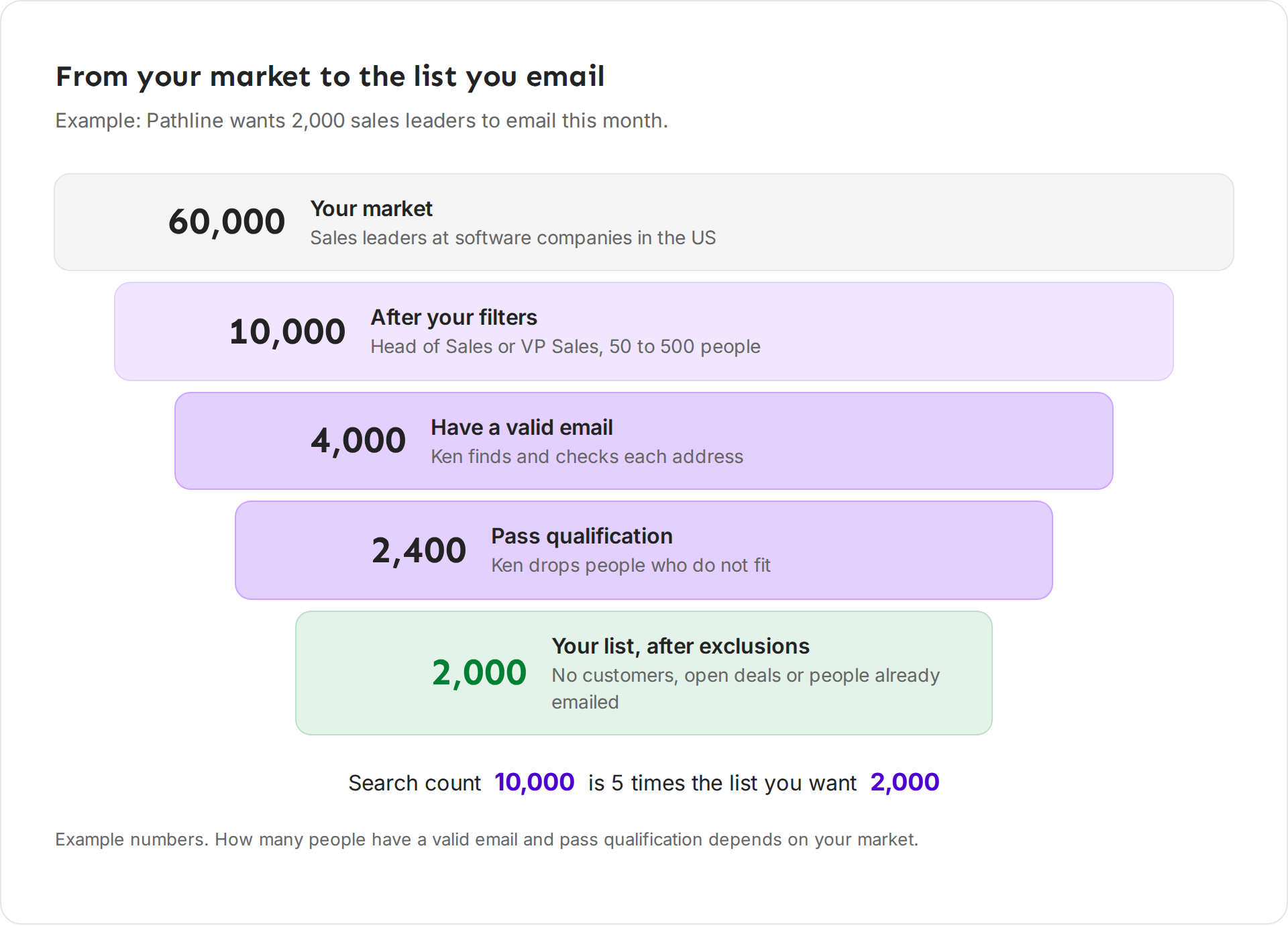
Then read the count against your goal:
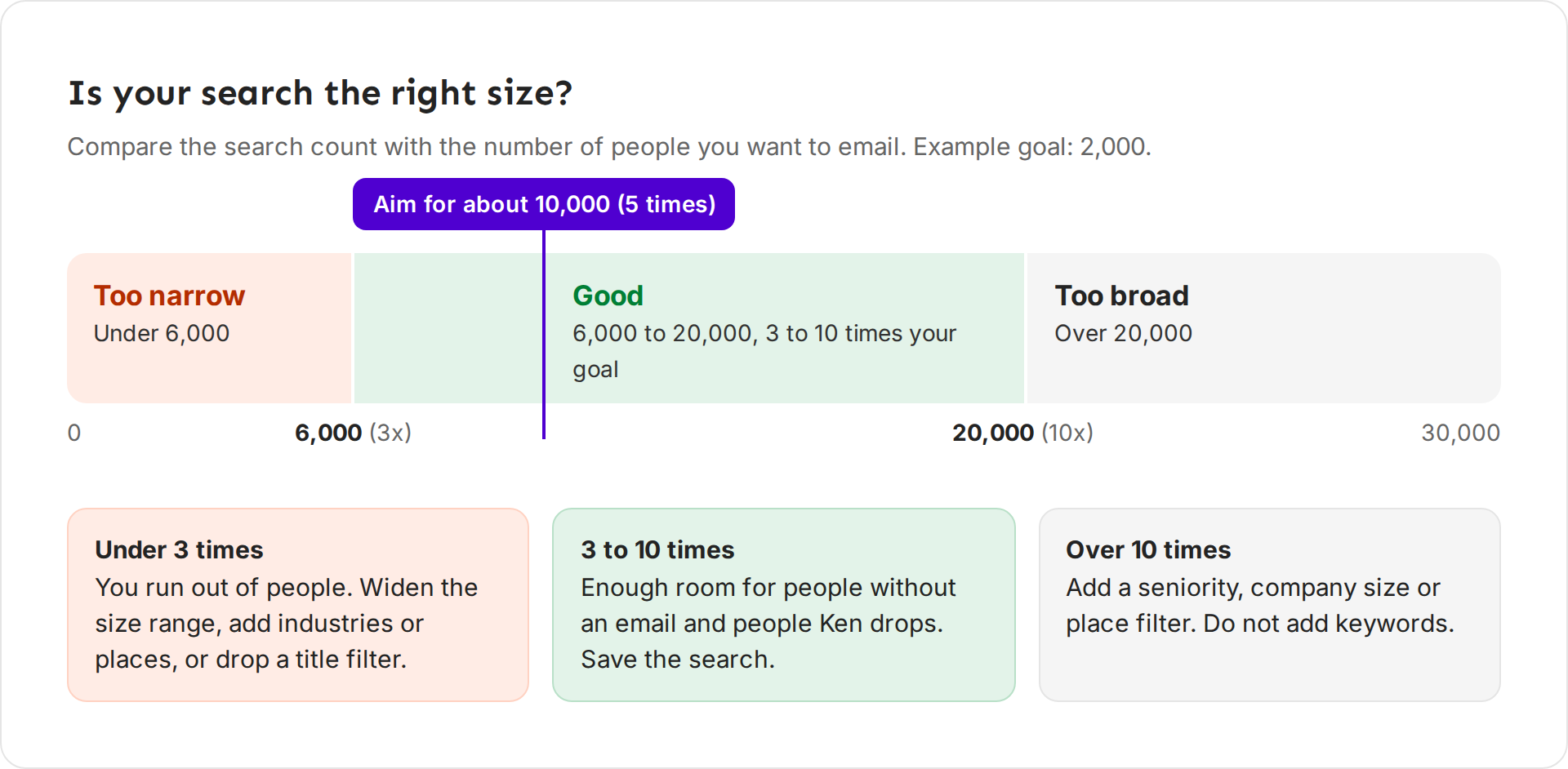
Under three times: loosen. Change one thing at a time and watch the count.
- Swap a short title list for Function and Seniority.
- Widen Company Headcount, such as 50 to 1,000 instead of 50 to 200.
- Add an industry or a country.
- Lengthen a signal window, such as 90 days instead of 30.
Over ten times: tighten. Add a Seniority level, narrow Company Headcount, or narrow the place. Do not add keywords.
If you still have under three times after three changes, the market may be too small for a campaign. Ken's team plans campaigns on an audience of at least 5,000 people. A smaller market is better worked one company at a time in Accounts. See Choose between Accounts and Campaigns.
How many people you need
Your goal comes from what your inboxes can send, not from how many people match.
- Emails a month. Multiply your inboxes by 30 cold emails a day and by your sending days. 30 a day is a safe default for a warmed inbox. Older, healthy inboxes can send more.
- New people a month. Divide by the number of emails in your sequence. Each person gets up to that many emails.
- Search size. Multiply by five.
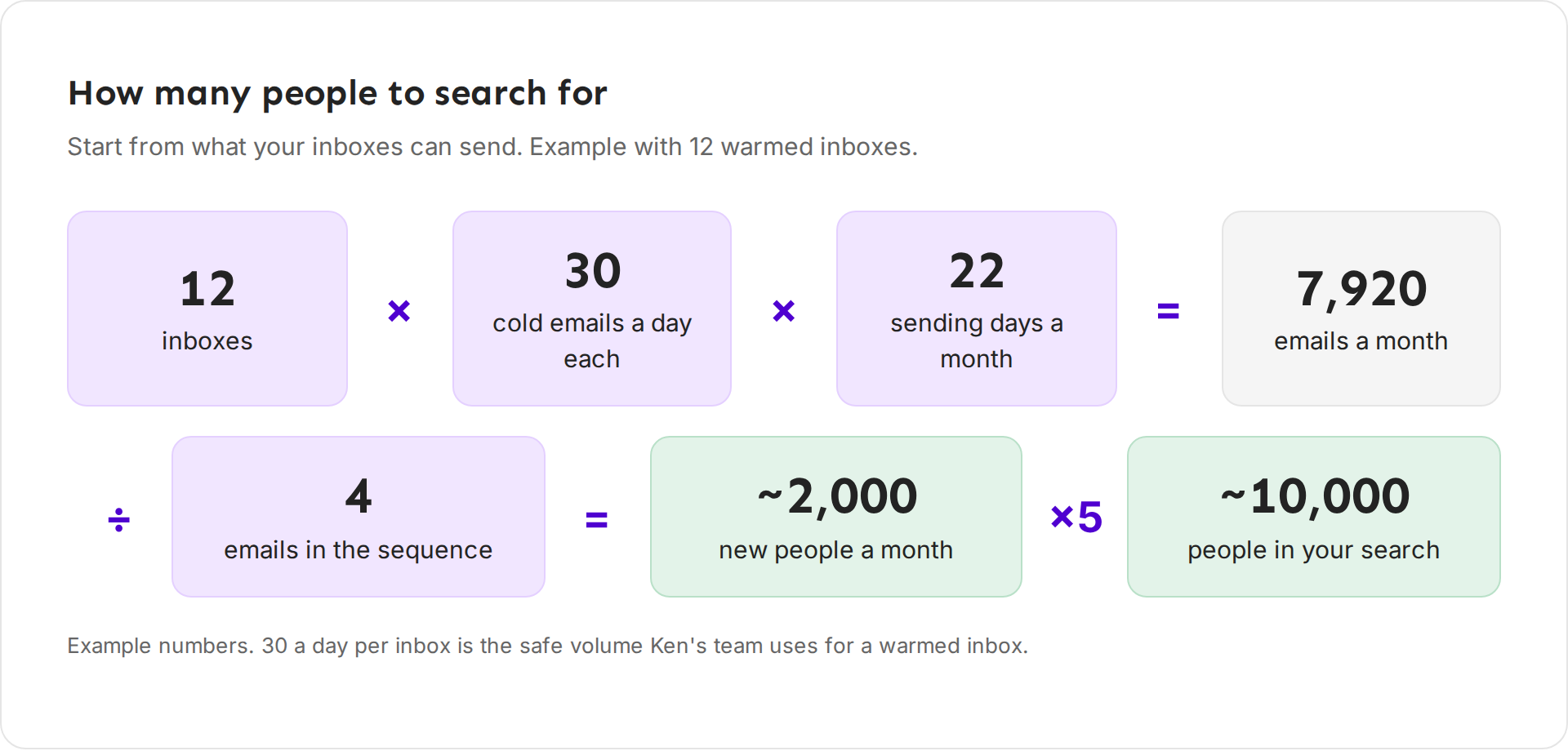
With 12 inboxes, 22 sending days and a 4-email sequence, you reach about 2,000 new people a month, so you search for about 10,000. To send more, add inboxes, not more emails per inbox. See How many inboxes do I need.
Lists go stale. B2B contact data changes by 2 to 3% a month as people change jobs, so a list from last quarter has gaps. Save the search and pull fresh people each month instead of reusing an old export. See Save a search and reuse it.
Keep out customers, open deals and people you already email
Emailing your own customer a cold pitch costs trust. Set exclusions before you add anyone.
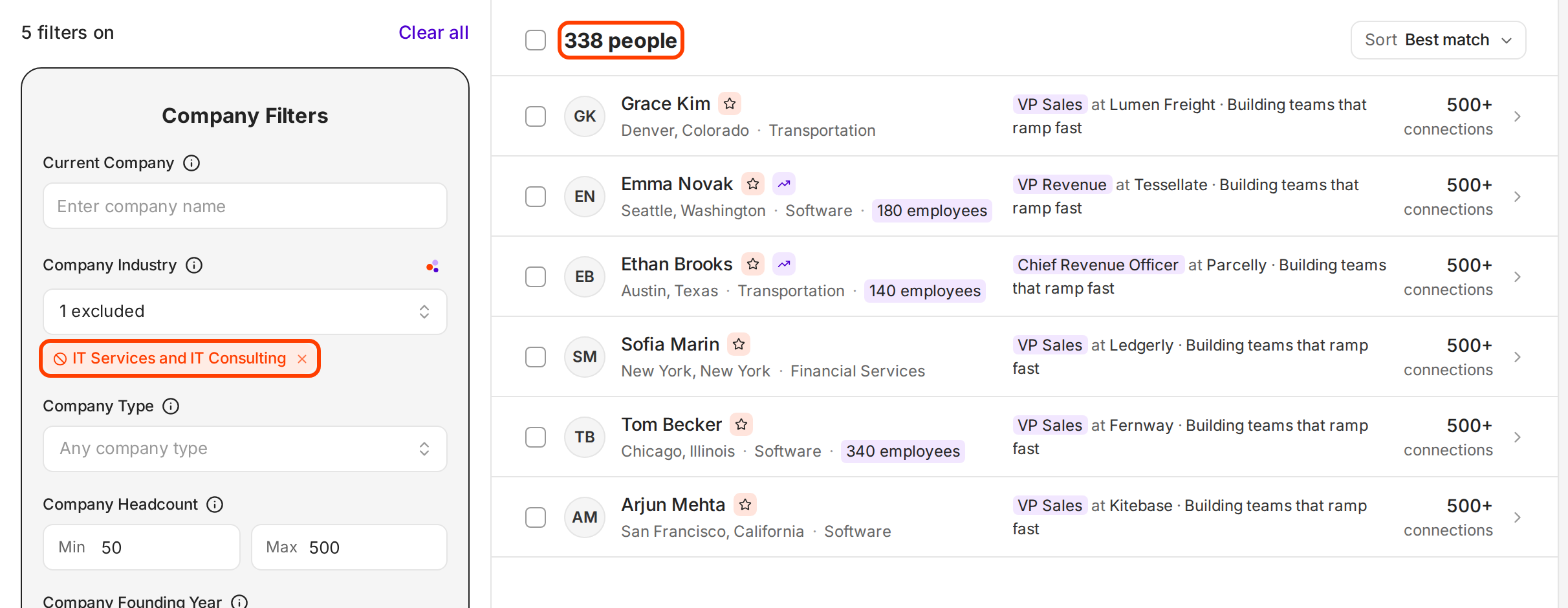
- A few companies. Type them in Current Company, then click each chip once to exclude it. An excluded chip turns red.
- A long list, such as all customers. Add their domains to the blocklist. Ken skips anyone on it. See Keep companies and people off your lists.
- Industries you never sell to. Tick them in the Exclude column of Company Industry, such as IT Services and IT Consulting when agencies are not your buyer.
- Titles you never sell to. Add them in Title, then click each chip to exclude it, such as "Intern" or "Assistant".
- Competitors and partners. Exclude them by company, and add them to your qualification rules so Ken drops any it finds.
- People Ken already reaches. When you import, Ken drops duplicates and anyone already in a campaign. Campaign workflows also have a Skip people in account plays step, so nobody at an account you work one to one gets bulk email.
Do not email many people at one company at once. On Job posts and Funding, Max people per company under Who to contact sets the cap. Ken's team never emails 15 people at one 40-person company on the same day.
Check a sample before you add
A short sample check finds a bad filter before anyone gets an email.
- Open 10 to 20 people from different parts of the results, not only the first page.
- For each, ask: right role, right company size, right industry, and would this person care about the problem?
- Check the companies too. Is any a customer, a competitor or an agency?
- If two or more of ten are wrong, find the filter that let them in and fix it. Common fixes are a title variant that is too loose, a missing exclusion or a size range that is too wide.
- When the sample looks right, click Save search.
Qualification is a safety net, not a second search. Do not repeat the search filters in your qualification rules. Write only what filters cannot check, such as "sells to other businesses" or "not a recruiting agency".
A worked example
Example numbers. Pathline wants about 2,000 people a month, so the target is about 10,000 in the search.
| Try | Filters | Count | Verdict |
|---|---|---|---|
| 1 | Title "VP Sales", United States | 3,100 | Too narrow: one title misses its variants |
| 2 | Function Sales, Seniority Director and VP, United States | 24,000 | Too broad: every company size |
| 3 | Try 2 plus Company Headcount 50 to 500, industry Software Development | 10,000 | Good: five times the goal |
| 4 | Try 3 plus IT Services and IT Consulting excluded, customers on the blocklist | 9,400 | Ready to sample and save |
Try 4 passed the sample check (one of ten was off), so Pathline saved it as "Heads of Sales · US software · 50 to 500 people" and added it to a campaign workflow. New matches now flow in daily.
Mistakes we see
- Keywords to "be precise". They shrink the list sharply and miss people who describe the same job in other words.
- One search for two buyers. Founders and sales leaders need different emails. Build two searches.
- No exclusions. A cold pitch to a customer in the middle of a renewal costs trust you need.
- An old export. Contacts change jobs every month. Fresh searches bounce less.
- Too many people per company. Five people at one small company getting the same email on the same day looks like spam, and they talk to each other.
Next: Find people and companies with Search, Save a search and reuse it or Choose your audience and split it into segments.