This playbook is for agencies that run outbound for clients with Ken. It follows the way Ken's own team runs campaigns for clients: one kickoff, a careful setup, client approval before anything sends, and a short report every week. Use it as the plan for a new client's first six weeks and as the rhythm after that.
The first six weeks at a glance
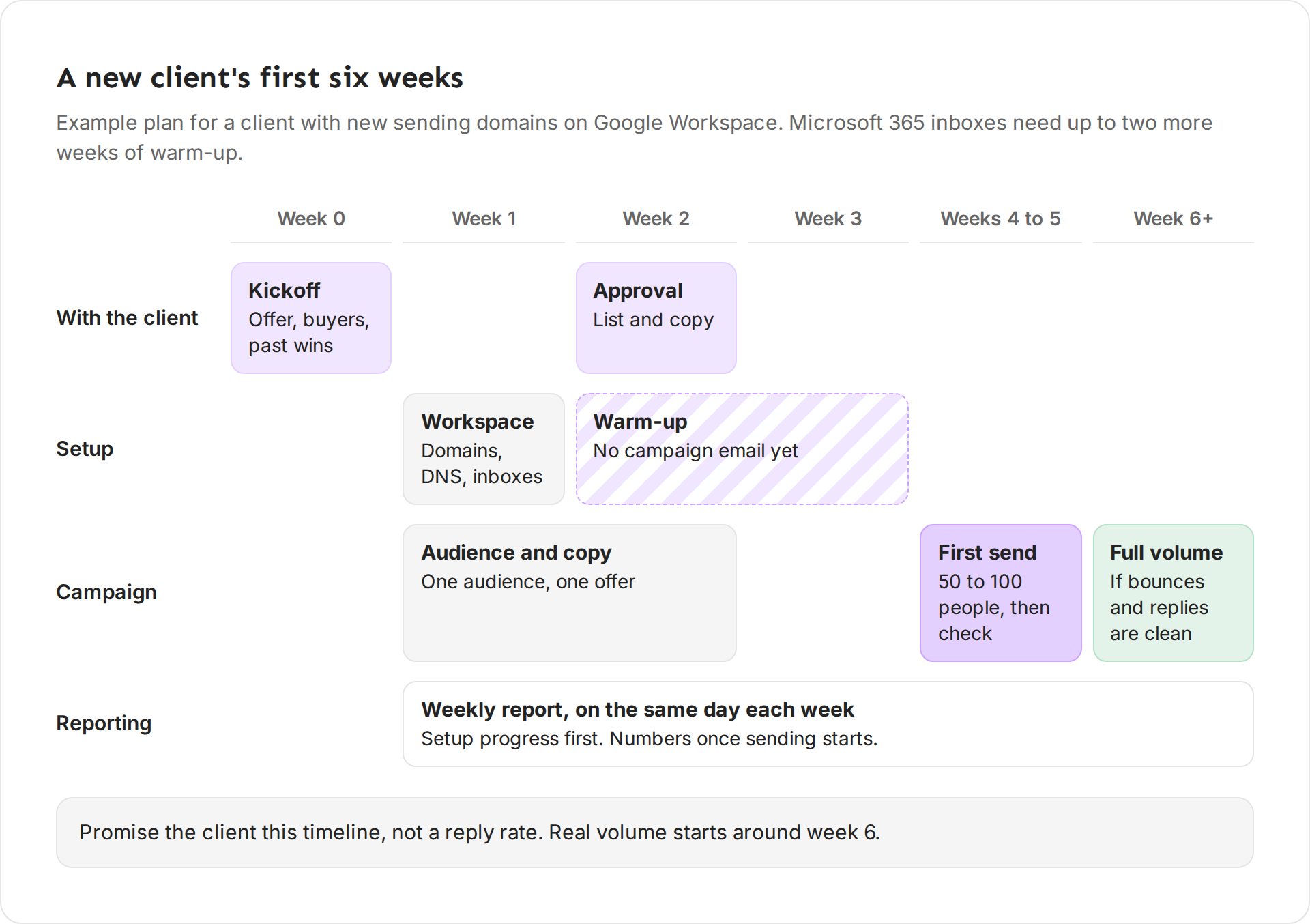
| When | With the client | Your team |
|---|---|---|
| Week 0 | Kickoff: offer, buyers, past wins | Create the client workspace |
| Week 1 | Answer questions on the plan | Domains, DNS and inboxes. Warm-up starts. List and copy start |
| Week 2 | Approve the lead list and copy | Warm-up. No campaign email yet |
| Week 3 | Weekly report on setup progress | Warm-up |
| Weeks 4 to 5 | Weekly report | A first small send, checked every day |
| Week 6 and on | Weekly report with numbers | Full volume, if bounces and replies look clean |
New domains on Google Workspace need 21 to 30 days of warm-up. Microsoft 365 needs 28 to 45 days, so plan up to two more weeks for those clients.
Kickoff in week 0
Plan one kickoff call. Leave it with these written down:
- Who the client is. Their website, their LinkedIn company page, and a two-line description of what they do, written as "we". Put it in the client's workspace under Settings > Company. Ken writes accounts and campaigns from it, so get the client to confirm it.
- The offer. One thing every email points to, such as a free check on the prospect's own data. Not a list of everything they sell.
- Who buys. Industries, company size, titles and regions. Ask for three recent customers they want more of, and why each one bought.
- Who to leave out. Current customers, open deals, competitors and partners. Add their domains to Settings > Blocklist before you build the list. Ken never researches or contacts what is on it.
- Their rules. Words they never use, compliance lines they need, claims they can't make. Write each rule down with the date, in one place your whole team reads.
- Who approves. One name for the lead list and copy, and whether any messages will send from their own inbox.
- A monthly target. How many new people to contact each month. Ken's team starts at 1,000 when a client has no number.
Start with one audience and one offer
Plan the first campaign as one broad audience and one offer. Split it into segments by who the people are, such as cold storage versus third-party logistics. Don't split it by copy angle. Copy angles are tests inside a segment.
Make the broad audience big enough. Ken's team only plans a campaign when the audience holds at least 5,000 people. A smaller idea gets combined with another one or widened. See Choose your audience and split it into segments.
Workspace and sending setup in week 1
- Create the client's workspace and give it credits. A new client workspace starts with 0 credits, and only you can open it. Invite your teammates to it from Members. See Run several client workspaces.
- Buy new sending domains. Never send cold email from the client's main domain. A burned main domain takes down their invoices, support mail and sales threads with it. Domains the client owns and you manage are best. If you part ways, the client keeps what they paid for.
- Set up DNS and inboxes, then let them warm up. No campaign email goes out until warm-up is done. See Set up sending domains and check their DNS and How warm-up works.
- Build the list and write the copy while the inboxes warm up. You lose no time, and the client has something to approve in week 2.
Client approval in week 2
Send the client one share link with the Lead list and the Copy with personalized lines. Set They can to Approve and turn on Hold the launch until approved. The client approves or comments item by item, and the campaign can't launch until they approve every item. See Share work with a client.
If you can't use share links, send the list and the copy another way and get a written yes before you launch.
If some messages will send from the client's own inbox, give them a client seat. Those messages wait on their Approvals page until they approve each one. See Approve messages as a client.
Handle feedback in one round
- Group the comments, then change everything at once. Send one updated link, not five small ones.
- Turn a preference into a rule. If the client says "never say guarantee", add it to their written rules so it holds for every future campaign, not only this one.
- Fix facts without debate. The client knows their product. Push back on style only when you have results that show what works.
The first send in weeks 4 and 5
Start the first send when the inboxes look healthy, not only when the date comes. Send to a first batch of 50 to 100 people, then stop and check bounces and replies before you send more.
Ken starts each new inbox at 5 campaign emails a day and adds 2 each sending day, up to 30. Volume grows on its own as long as bounces stay low. Don't push it faster for an impatient client.
The weekly rhythm
Once sending starts, keep the same rhythm every week:
- Every day. Read the replies and answer interested ones the same day. Check Delivery for bounce spikes.
- Monday. Look at last week's numbers and plan this week's changes.
- Midweek. Ship the changes, such as a new segment, a rewritten step or more leads.
- Friday or Monday. Send the weekly report. Pick one day and keep it.
The weekly report
A weekly report shows what happened, what you did and what comes next. It fits on one page.
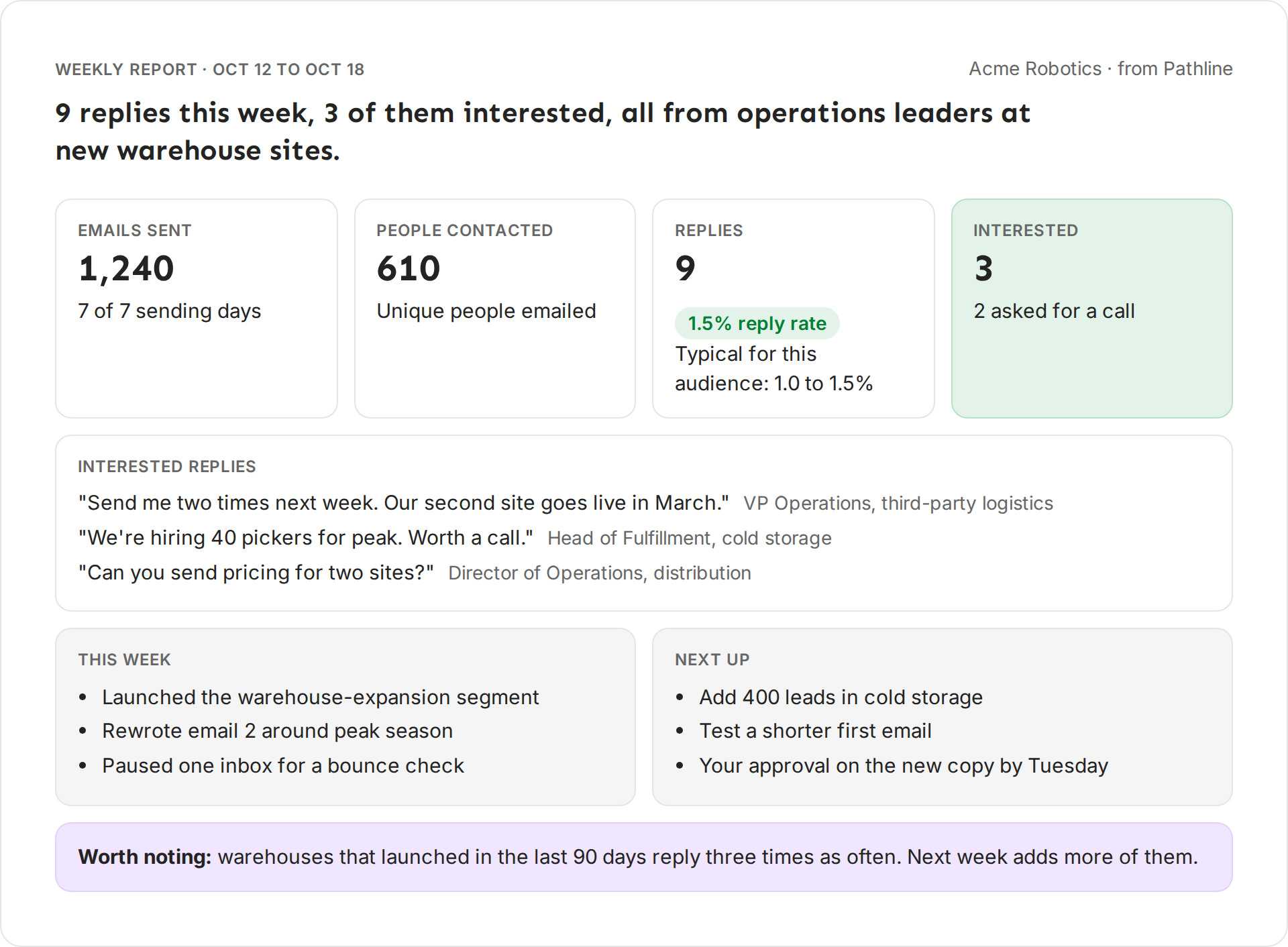
What goes in, in this order:
- A headline with a number. "9 replies this week, 3 of them interested, all from operations leaders at new warehouse sites." Not "Great week, campaigns are performing well."
- The scoreboard. Emails sent, people contacted, replies with the reply rate, and interested replies. Reply rate is replies divided by people contacted, not by emails sent. Put the typical range for the client's audience next to it (see "Set expectations at kickoff" below).
- Three interested replies. Pick the three best of the week and quote them. If you have fewer than three good ones, leave this part out.
- This week. Up to five things you did, in plain words: "Rewrote email 2 around peak season."
- Next up. Up to five things you will do, including anything you need from the client.
- Worth noting. Only when you have a real finding, such as one segment replying three times as often as the rest. Leave it out otherwise.
Rules that keep the report honest:
- Never report open rate. Track opens is off by default because open tracking hurts deliverability, so opens don't count.
- Say when a week was short. If sending paused for three days, write "4 of 7 sending days" so nobody compares it to a full week.
- No numbers before sending starts. During setup, report progress instead: domains warming, lead list approved, first send day.
- A click count of 0 usually means tracking is off. Say so, or leave clicks out. Don't show 0 as a bad result.
- No tool or vendor names. The client buys results from you, not a list of tools.
Send it with a two-line cover note. The report carries the numbers, so the note doesn't repeat them:
Hi Lena,
Here's your report for Oct 12 to Oct 18. One thing needs you: approve the new copy by Tuesday.
Jordan
You can also share a Weekly report with the client and turn on Send a fresh report every Monday. Ken then makes a new report for the week just ended every Monday at 8 AM in the campaign's time zone, and emails everyone on the link.
Once a month, add a longer review: what worked, what you would cut, the plan for next month, and a short "where we need you" list. Ask for the pipeline and meeting results you can't see. Show missing data as N/A, never as 0.
What to share, and how
| What | How | When |
|---|---|---|
| Lead list and copy | Share link set to Approve, launch held | Before every launch |
| Messages from the client's inbox | Client seat, Approvals | Whenever you plan them |
| Weekly report | Share link set to View, every Monday | Every week |
| Account plans for top accounts | Share link set to Comment | When you start working an account |
| Replies | Client seat Inbox, if they book their own meetings | Every day |
| Sending health | Client seat Delivery, view only | Any time |
Keep your research, credits and other clients in your own workspace. A client seat never sees them. See What a client seat can see and do.
Set expectations at kickoff
Most unhappy clients expected something nobody promised. Say these four things in week 0:
- We promise a timeline, not a reply rate. Setup and warm-up take four to five weeks. Real volume starts around week 6.
- Replies and interested replies are the scoreboard. Opens don't count, and Track opens stays off because open tracking hurts deliverability.
- Volume grows with inbox reputation. Sending more too soon can push mail to spam for every campaign.
- Your sales team's replies matter. Answer interested replies the same day. How your team replies also affects how inboxes treat your mail.
Then give them a fair range for their audience. Ken's team starts from the typical reply rates in Read campaign results. They run from 0.3 to 0.5% for the C-suite at large public companies up to 1.5 to 2% for owners of small businesses and agencies.
Use the range to judge progress, and put it next to the reply rate in every weekly report. A mid-market software client at 1.2%, against a range of 1 to 1.5%, is on track, even if they hoped for 5%.
If something goes wrong
- "The client wants to start sending this week." Explain the warm-up. Sending from cold inboxes puts every future campaign at risk. Use the weeks for the list, the copy and their approval.
- "The client wants to send from their main domain." Say no and explain why: one bad week can stop their invoices and support mail from landing. Their own inbox is fine for a few one-to-one messages through a client seat.
- "The client hasn't approved after a week." Click Send a reminder on the share link. Then call. A name and a date in Next up ("your approval by Tuesday") helps.
- "The client asks for open rates." Explain that Track opens stays off because open tracking hurts deliverability. Show the reply rate against their range instead.
- "Replies dropped this week." Check Delivery first, then whether the campaign ran low on new leads. Say what you found in the headline, not in a footnote.
Next: Run several client workspaces, Share work with a client or Read campaign results.