A new inbox has no sending history, so inbox providers don't trust it yet. Warm-up builds that trust with a small, steady flow of email that gets opened and answered. Ken runs warm-up for the inboxes you buy from Ken. This guide shows how long to wait before campaigns, how Ken raises campaign volume, and how to read an inbox's warm-up status.
What warm-up does
Ken sends warm-up email between your inbox and other inboxes in a warm-up network. Those inboxes open the email and reply, and Ken answers the replies for you. Day by day, Gmail and Outlook learn that your inbox sends email people want.
Inboxes you buy from Ken start warm-up on their own. Ken can't run warm-up for an inbox you connect yourself, such as a Google Workspace, Microsoft 365 or SMTP inbox you already had. Warm those up outside Ken before they send campaigns, or buy Ken inboxes for new volume.
Five things to know:
- Warm-up keeps running after the inbox is ready. It runs next to your campaigns and keeps the inbox's reputation steady. Leave it on.
- Warm-up email doesn't count toward the inbox's Daily send limit, and it never uses credits. Your mail provider still counts it. An inbox that sends 30 campaign emails and 20 warm-up emails is a 50-a-day inbox to Gmail.
- Keep the inbox in an active campaign. When an inbox from Ken isn't in an active campaign for 30 days, Ken pauses its warm-up. A paused or completed campaign doesn't count. Warm-up starts again within a day after you add the inbox to an active campaign.
- Use one warm-up tool per inbox. If the inbox also runs warm-up in another tool, turn that one off. Two tools double the volume and look unnatural.
- Warm-up can't fix a bad list or a weak offer. If people don't want your email, they still mark it as spam, and that hurts more than warm-up helps.
Set up the domain's DNS records before warm-up starts. See Set up sending domains and check their DNS.
How long to warm up
How long depends on how new the domain is and on the mail provider. Our deliverability playbook uses these minimums before the first campaign:
| Your setup | Warm-up before campaigns |
|---|---|
| New domain, Google Workspace inbox | 21 to 30 days |
| New domain, Microsoft 365 inbox | 28 to 45 days |
| Older, healthy domain, new Google Workspace inbox | 10 to 14 days |
| Older, healthy domain, new Microsoft 365 inbox | 14 to 21 days |
In the app, an inbox's Progress counts Ken's 7-day minimum, as in "Day 5 of 7". After that it reads "Ready". Ready means the inbox has passed Ken's minimum. For a new domain, keep waiting until the times in the table, and add the inbox to a sending campaign only then.
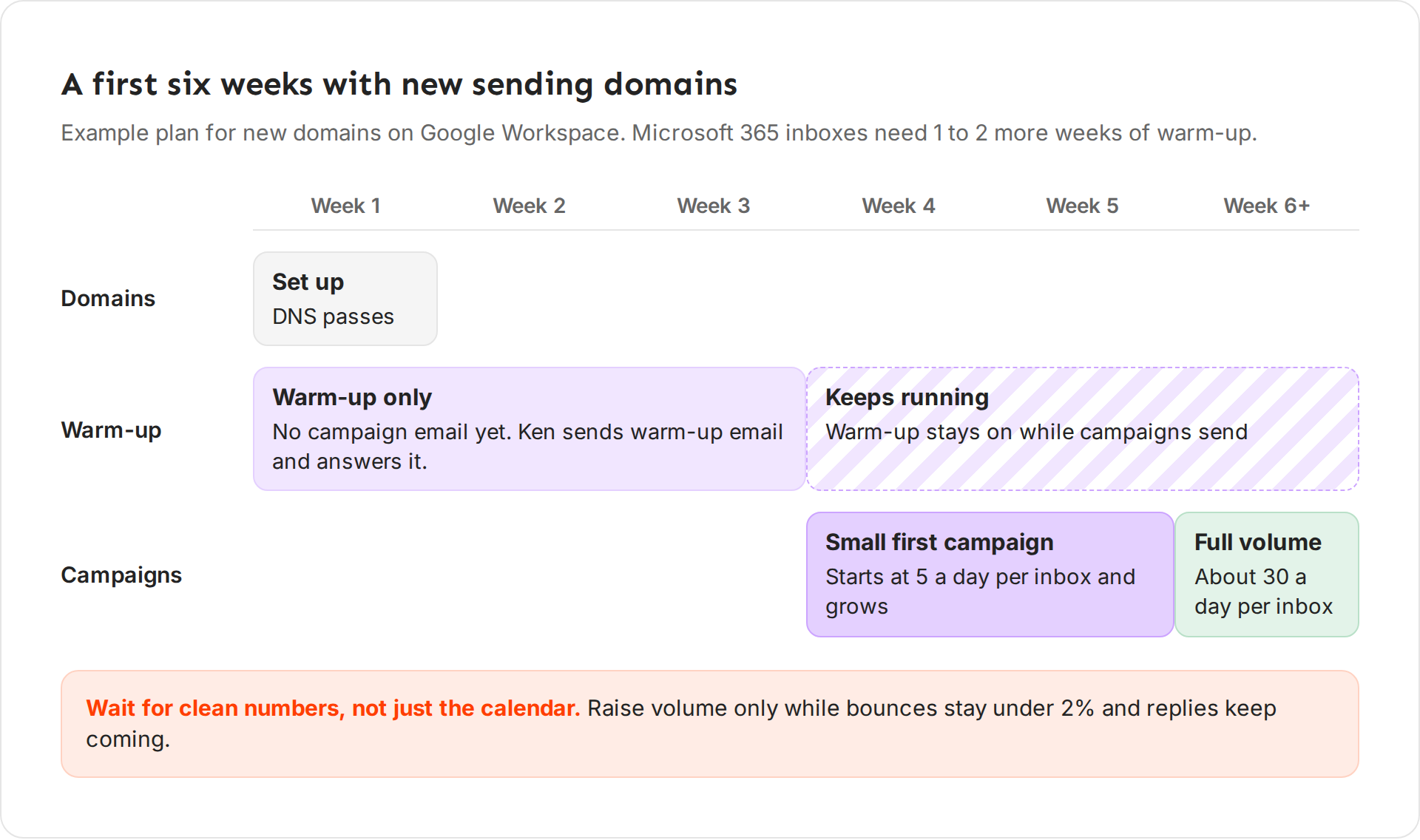
An example first six weeks with new Google Workspace domains:
- Week 1. Set up the domains. All DNS checks pass.
- Weeks 1 to 3. Warm-up only. No campaign email yet.
- Weeks 4 and 5. A small first campaign. Each inbox starts at 5 campaign emails a day and grows.
- Week 6 and later. Full volume, about 30 campaign emails a day per inbox. Warm-up keeps running the whole time.
Wait for clean numbers, not only the calendar. Raise volume only while bounces stay under 2% and replies keep coming.
How Ken ramps a new inbox
Even after warm-up, Ken doesn't send a new inbox's full volume on day one. On the inbox's first sending day it sends up to 5 campaign emails. Each sending day after that, it allows 2 more: 7, then 9, then 11, up to 29 on day 13. From day 14 the ramp is done, and the inbox's own Daily send limit applies.
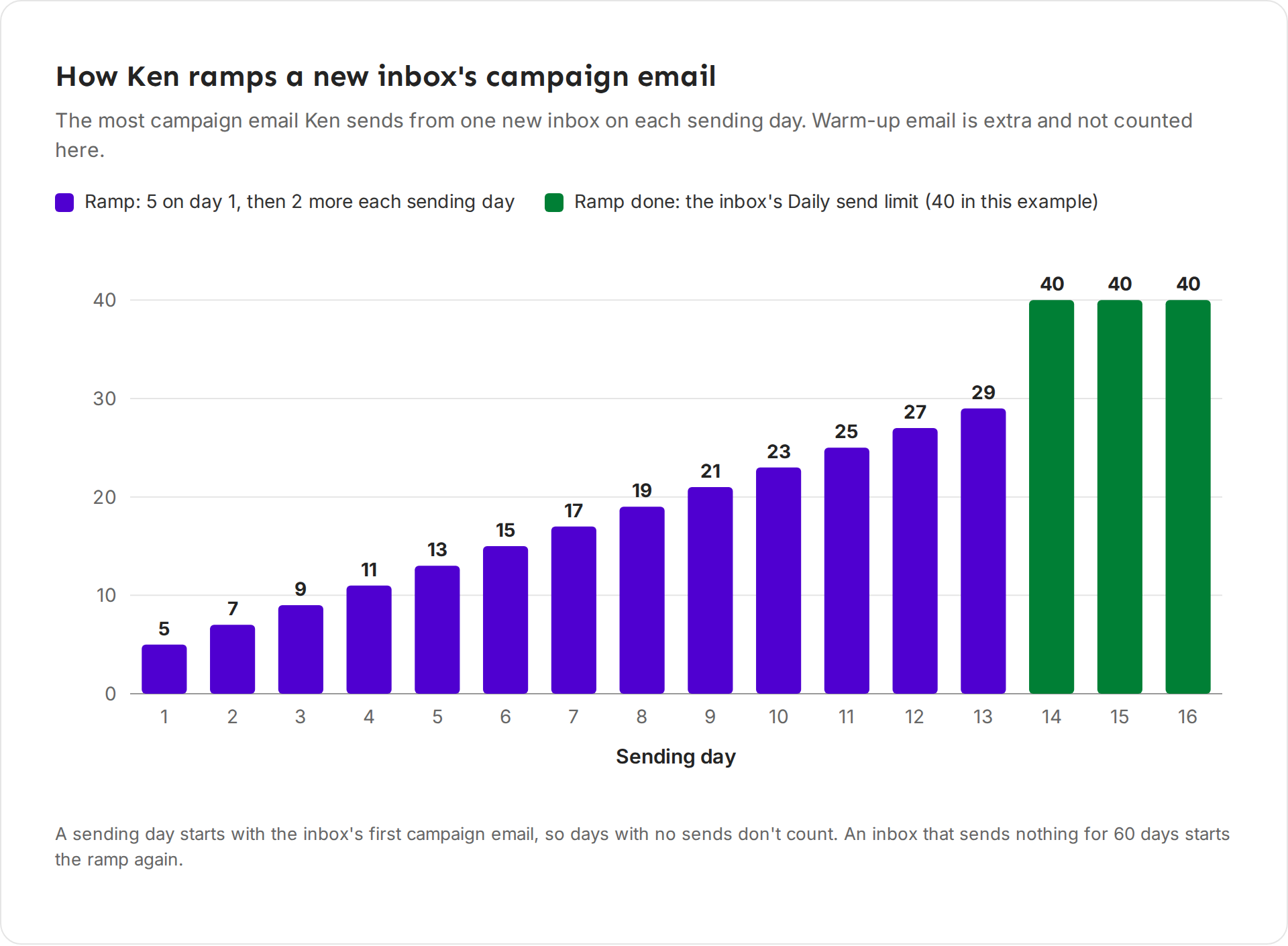
How the ramp counts:
- A sending day starts with the inbox's first campaign email and lasts 24 hours. Days with no campaign email don't count, so weekends without sends don't move the ramp.
- While more than 4% of the inbox's emails bounce over the last 7 days (with at least 20 sent), the ramp doesn't grow.
- Ken counts only the sending days of the last 60 days. An inbox that sends no campaign email for 60 days starts the ramp again from 5.
- Whatever its limit, Ken sends at most 50 campaign emails a day from one inbox.
The domain's Ramp-up
The domain's Ramp-up setting is a second ramp you control, from 0 to 30 days. It starts with the domain's first campaign email and counts calendar days, so days without sends still count. On each day it allows a share of the limit: day 2 of a 5-day Ramp-up allows 40%. While it runs, the inbox's Daily send limit says so, for example "getpathline.com is ramping up, so today it sends up to 12."
The two ramps stack. Ken takes the inbox's ramp number and applies the domain's share to it. Here is a new inbox on a new domain with a 5-day Ramp-up, sending every day:
| Day | Inbox ramp | Domain Ramp-up | Ken sends up to |
|---|---|---|---|
| 1 | 5 | 20% | 1 |
| 2 | 7 | 40% | 3 |
| 3 | 9 | 60% | 6 |
| 4 | 11 | 80% | 9 |
| 5 | 13 | 100% | 13 |
So a long Ramp-up on a new domain slows the first weeks a lot. For new Ken inboxes the inbox ramp is already gentle, so keep the domain's Ramp-up short.
Check an inbox's warm-up
-
Open Delivery in the sidebar, or press G then D.
-
On the Inboxes tab, click the Warming up filter to see the inboxes in warm-up. Their Used by column reads "Warming up", sometimes with the days left.
-
Click an inbox. Its side panel opens.
-
Under Sending, find Warm-up. When the switch is on, it reads "On. Ken sets the daily warm-up volume and replies to warm-up emails for you."
-
Read the three facts under it: Status, Progress and Started.
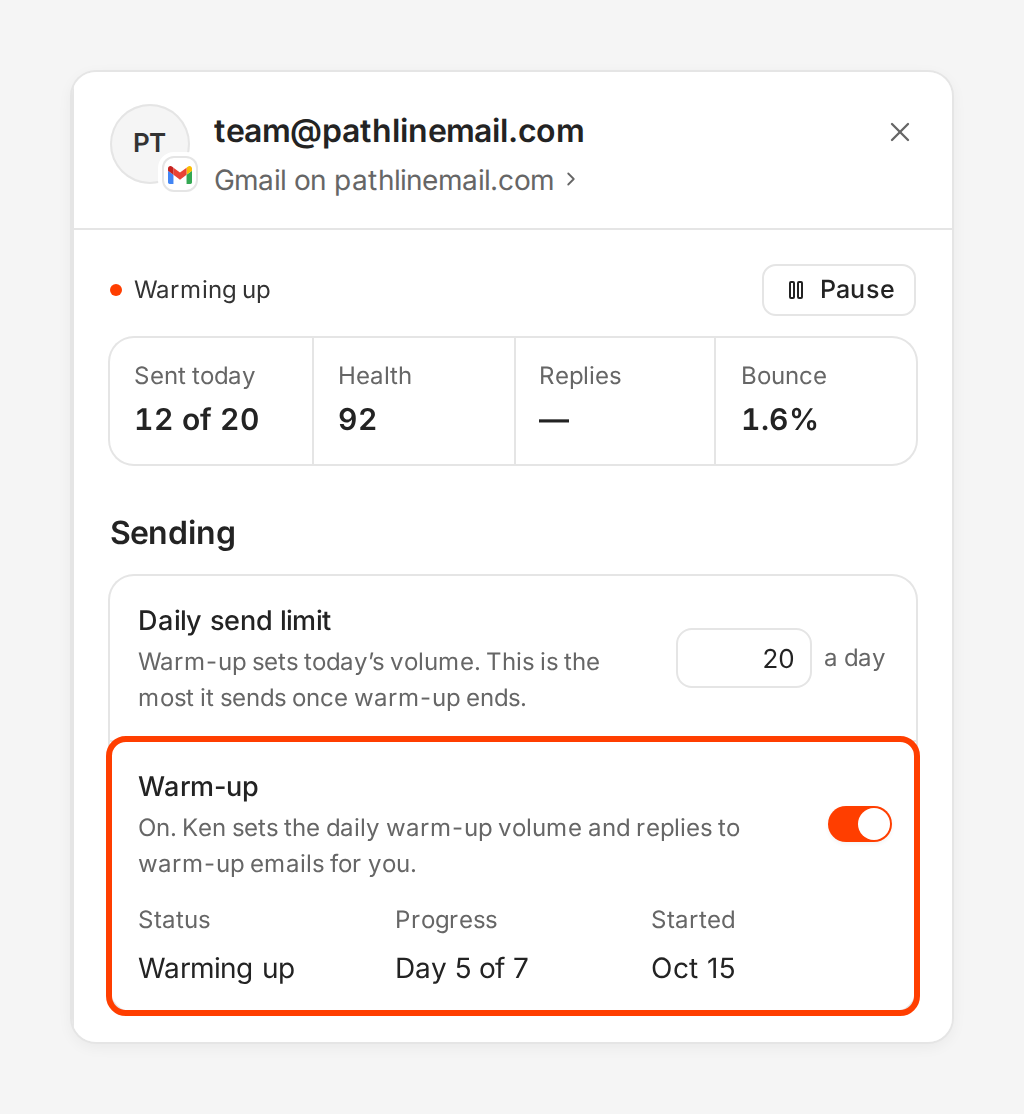
Day 5 of 7 means the inbox is five days into Ken's 7-day minimum. -
To pause or resume warm-up on an inbox from Ken, click the switch, then click Save changes.
What each status means
| Status | What it means |
|---|---|
| Not started | Warm-up hasn't started for this inbox. Inboxes you connect yourself usually show this. |
| Starting | Ken is adding the inbox to warm-up. |
| Warming up | Warm-up is running. It can say this even when Progress says "Ready", because warm-up keeps running. |
| Paused | Warm-up isn't running for now. Ken pauses it when the inbox isn't in an active campaign for 30 days, or when its monthly credits weren't paid for 14 days. |
| Done or Keeping warm | The first warm-up is complete, and Ken keeps a smaller flow going. |
| Failed | Ken couldn't add the inbox to warm-up. Write to [email protected] with the inbox address. |
| Degraded | Warm-up runs with problems. Keep campaign volume low on this inbox and watch its bounces. |
Progress shows "Not confirmed" when the 7 days have passed but Ken can't confirm that warm-up ran in the last few days.
Credits and warm-up
Warm-up never uses credits. When your workspace runs out of credits, Ken shows "You're out of credits. Research, email finding and AI work are paused. Sending and warmup keep running." Campaign email stops only when the month's included sends are used up and no credits are left. See How credits work.
Inboxes you buy from Ken cost 200 credits ($4) a month each. If Ken can't take that payment, campaign email from the inbox waits. Warm-up keeps running for 14 days, then pauses. After 30 days without payment, Ken deletes the inbox. Add credits before then to keep it.
Warm up again after a problem
If an inbox had a bounce spike or spam complaints, rest it and warm it up again. The playbook's plan:
- Pause the inbox. A paused inbox sends nothing, and warm-up keeps running.
- Leave it on warm-up only for 7 to 14 days.
- Resume it at about 25% of its old daily limit. For an inbox that sent 40 a day, set the Daily send limit to 10.
- Raise the limit by 30 to 50% each week while bounces stay under 2%.
When warm-up is off, the switch reads "Off. Turn it on for new inboxes or after a bounce spike."
If something goes wrong
- "Status says Paused, but I didn't pause it". The inbox hasn't been in an active campaign for 30 days, or its monthly credits weren't paid. Add it to an active campaign, or add credits. Turning the switch back on alone doesn't last, because Ken pauses it again the next day.
- "I turned warm-up on for my own inbox, and it didn't save". Ken runs warm-up only for inboxes you buy from Ken. Warm your own inbox outside Ken, with one tool only.
- "Progress says Ready but Status still says Warming up". That is normal. Warm-up keeps running after the minimum.
- "My new inbox sends only 5 campaign emails a day". That is the ramp. It adds 2 each sending day, and after 14 sending days the inbox's own limit applies.
- "My new inbox sends only 1 or 3 a day". The domain's Ramp-up stacks on the inbox ramp. Check the domain's side panel. It grows each day.
Next: Keep your email out of spam, Fix an inbox that needs attention or How many inboxes do I need.