Ken charges for research, email finding and AI work in credits. One credit is $0.02 everywhere, whether it comes with your plan, from a pack you buy or from auto top-up. Sending within your plan, searching the Ken database and work done with your own provider keys cost 0 credits.
Where your credits come from
- Your plan. Platform adds 5,000 credits ($100) and 200,000 sends at the start of each billing month. Unused plan credits roll over for one more month, then expire.
- The Free plan. A workspace on Free gets 1,000 credits once, with no card. They never expire. On Free, every send uses credits too.
- Credits you buy. Packs and auto top-up credits never expire.
Ken spends the credits that expire soonest first. Credits that never expire, like the ones you bought, are always the last to go.
Read your balance
Your available credits show at the bottom of the sidebar, in dollars too. Hover over them for the full split, or click them to open Billing.
-
Press G then , to open Settings, or click the gear next to your name.
-
Click Billing under Workspace.
-
Read the top card.
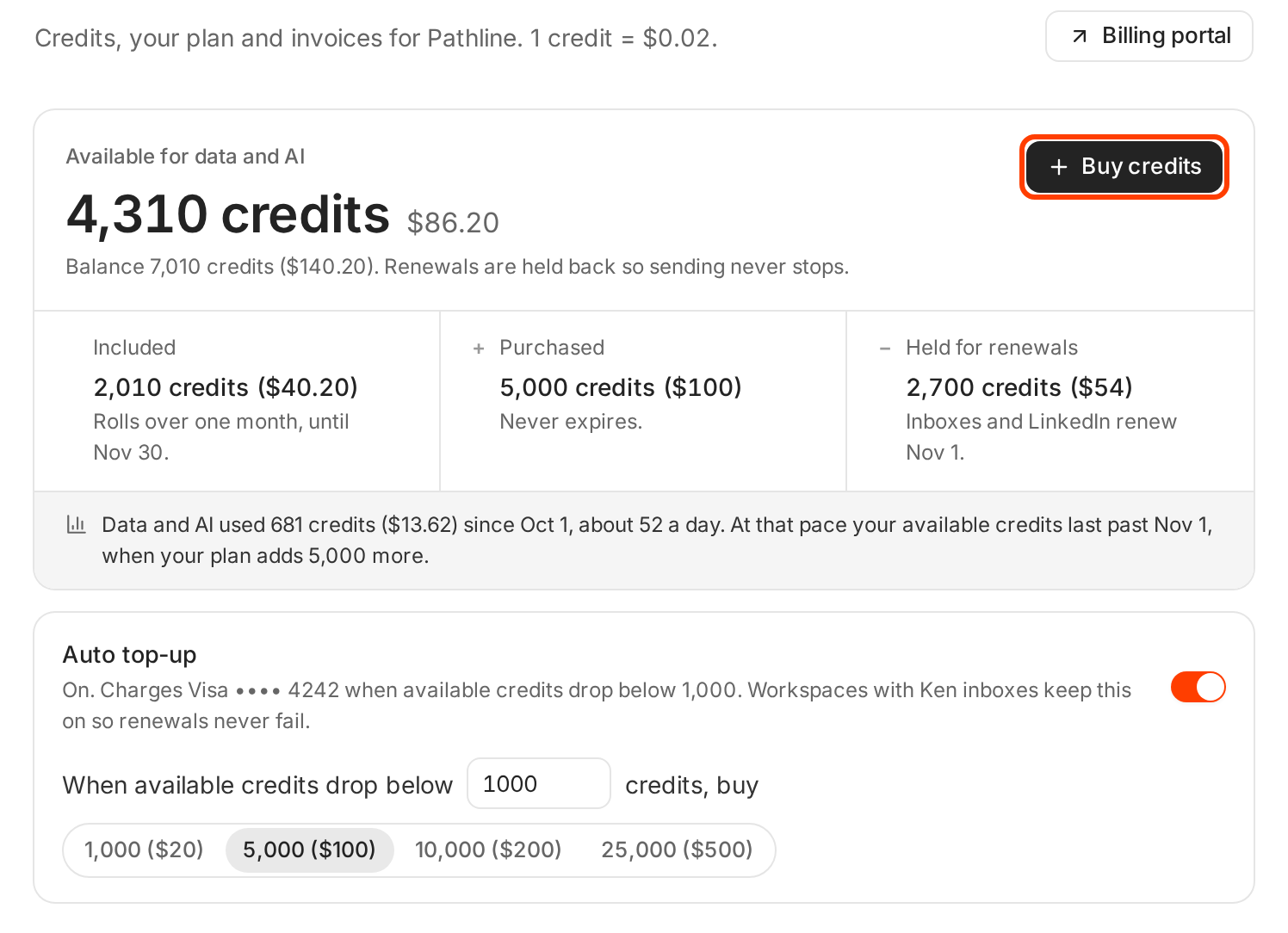
Available is your balance minus what Ken holds back for renewals.
The card has three parts:
- Included is what is left of your plan credits, with the date they expire.
- Purchased is what is left of credits you bought.
- Held for renewals is what Ken sets aside for next month's Ken inboxes, domains and LinkedIn accounts.
Available for data and AI is your balance minus the held part. That is what research, email finding and AI work can spend. Holding renewals back means a big research run never stops your sending. Under the card, Ken shows how fast you used credits this billing month and whether they last until your plan adds more.
What costs credits
These are Ken's own rates. Most of them are also at the bottom of the Billing page, under What credits buy.
| What | Credits | When Ken charges |
|---|---|---|
| Valid email | 1 ($0.02) each | Only when Ken finds and verifies one |
| Account research, signals and scoring | About 12 ($0.24) per account | Each research run, based on the actual work |
| AI qualification, with segments and scoring | 50 per 1,000 rows ($1) | Each row Ken checks |
| AI personalization | 300 per 1,000 leads ($6) | Each lead Ken writes for |
| Campaign builds and agent runs | 100 ($2) per $1 of model cost | Each run. Platform includes 1 free build each billing month |
| Reply assist and autonomous replies | 100 ($2) per $1 of model cost | Each reply Ken drafts |
| Studio page link | 1 ($0.02) per page | When a page first publishes, and each time you republish it |
| Extra sends | 25 per 1,000 ($0.50) | Only past the 200,000 sends in your plan |
| Ken inbox, Google Workspace or Microsoft 365 | 200 ($4) per inbox | Every month |
| Prewarmed inbox | 300 ($6) per inbox | Once |
| Azure domain, up to 100 inboxes | 2,500 ($50) per domain | Every month |
| Ken SMTP domain | 1,500 ($30) per domain | Every month |
| LinkedIn account | 1,500 ($30) per account | Every month |
| Domain name | Registrar price plus 3%, rounded up to the whole dollar, at 50 credits a dollar | Once a year, up front |
A domain with a $10.40 registrar price costs $11, which is 550 credits for the year. Each renewal uses the registrar's renewal price, and for some domains that is higher than the first year.
What is free
- Searching the Ken database, filters, company data and lookalikes
- Profile and website enrichment
- Verifying a list you upload
- Basic warm-up
- Sending within your plan's included sends
- The support agent
- Any work that runs on your own provider keys
Where a month of credits goes
Here is one example month on Platform. The team has 5 Ken inboxes, researches 40 target accounts and runs one campaign that ends with 1,500 leads with a valid email.
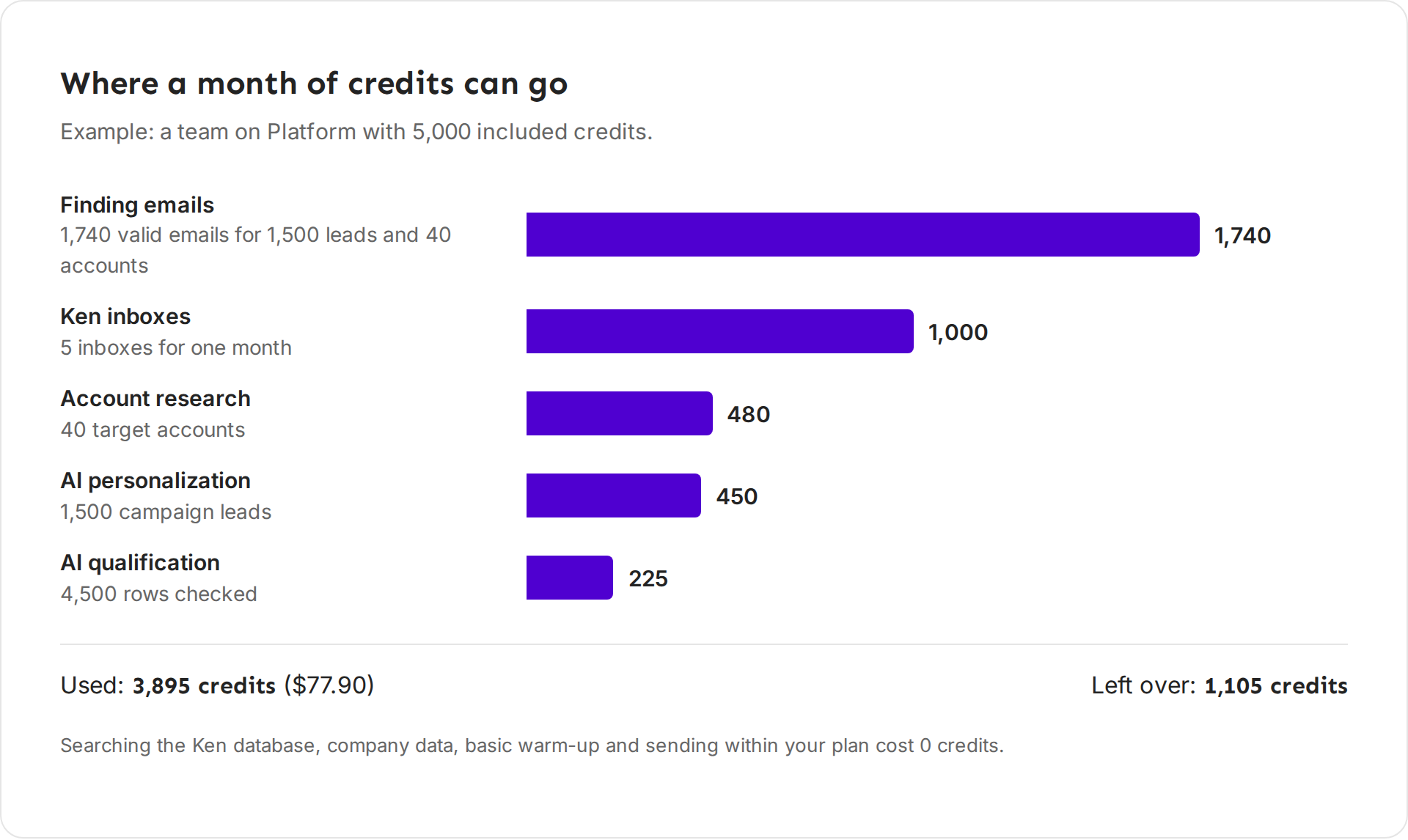
| Line | How it adds up | Credits |
|---|---|---|
| Finding emails | 1,500 campaign leads, plus about 6 people at each of 40 accounts | 1,740 |
| Ken inboxes | 5 inboxes at 200 each | 1,000 |
| Account research | 40 accounts at about 12 each | 480 |
| AI personalization | 1,500 leads at 0.3 each | 450 |
| AI qualification | About 3 rows checked for each lead kept, 4,500 rows at 0.05 each | 225 |
Email finding is the biggest line in this example because every valid email costs a credit. Two habits cut it the most. Use AI qualification, so Ken drops poor fits before it looks for their emails. And for large volumes, use your own email finder key. See Get more from your credits.
When credits run out
When your available credits reach zero, Ken shows a banner: "You're out of credits. Research, email finding and AI work are paused. Sending and warmup keep running." The credits chip in the sidebar turns orange and reads Out of credits.
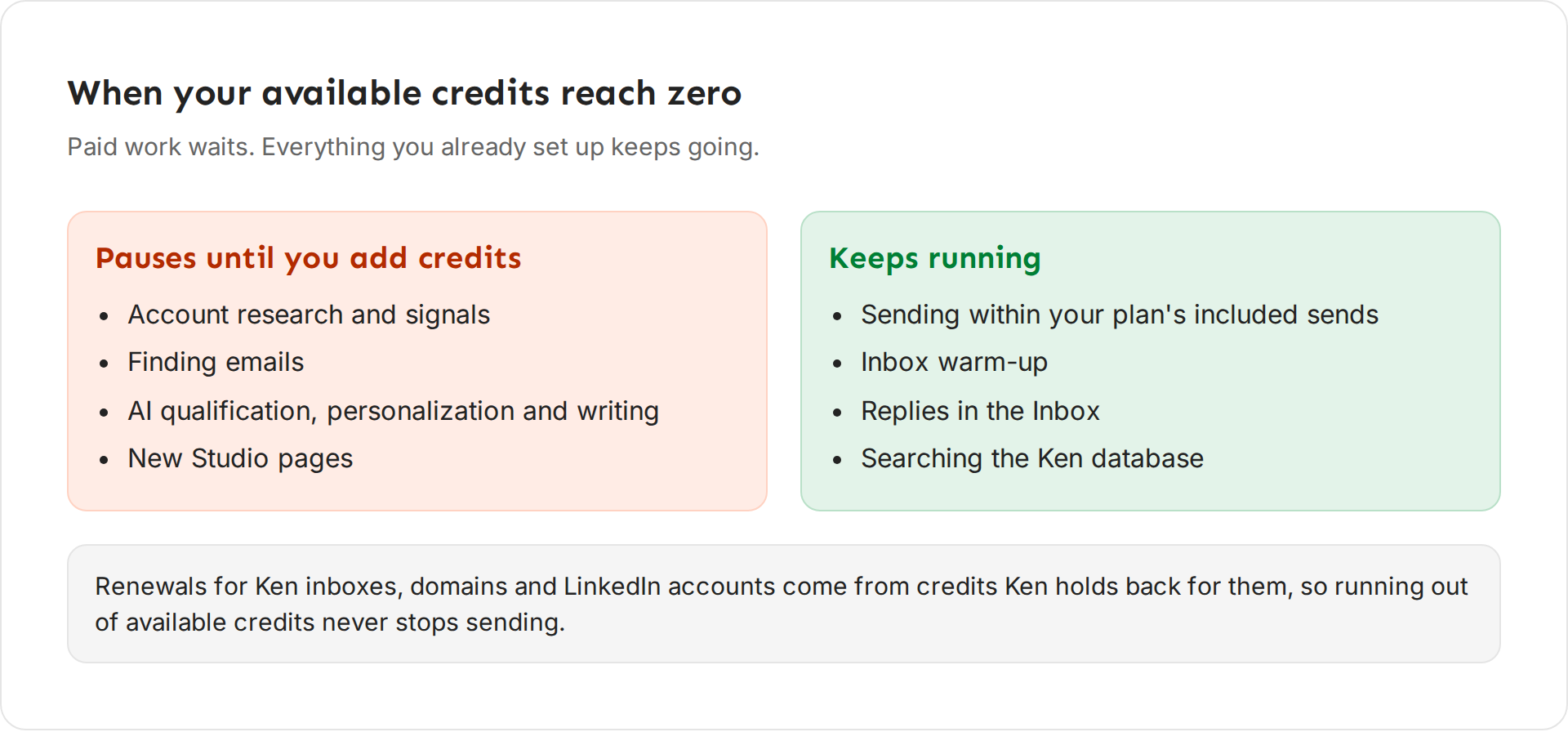
- Pauses until you add credits: account research and signals, finding emails, AI qualification, personalization and writing, and new Studio pages.
- Keeps running: sending within your plan's included sends, inbox warm-up, your replies in the Inbox, and searching the Ken database.
Nothing is lost. Paused work picks up where it stopped as soon as you add credits.
If a renewal can't be paid
Renewals come from the credits Ken holds back, so running out of available credits doesn't touch them. A renewal fails only when your whole balance is too low, for example after unused plan credits expire. Then:
- Sending from the unpaid inboxes and LinkedIn accounts pauses at once.
- Ken tries the renewal again every hour, so adding credits pays it and sending resumes.
- Warm-up keeps running for 14 days, then pauses.
- After 30 days unpaid, Ken deletes those inboxes, domains or LinkedIn accounts.
Auto top-up prevents all of this.
Buy credits
You need the Billing and credits permission. Admins have it.
-
On the Billing page, click Buy credits. The same button is on the out of credits banner and on any estimate that comes up short.
-
Pick 1,000, 5,000, 10,000 or 25,000 credits, or set the number of packs with the minus and plus buttons. A pack is 1,000 credits ($20). You can buy up to 100 packs at a time.
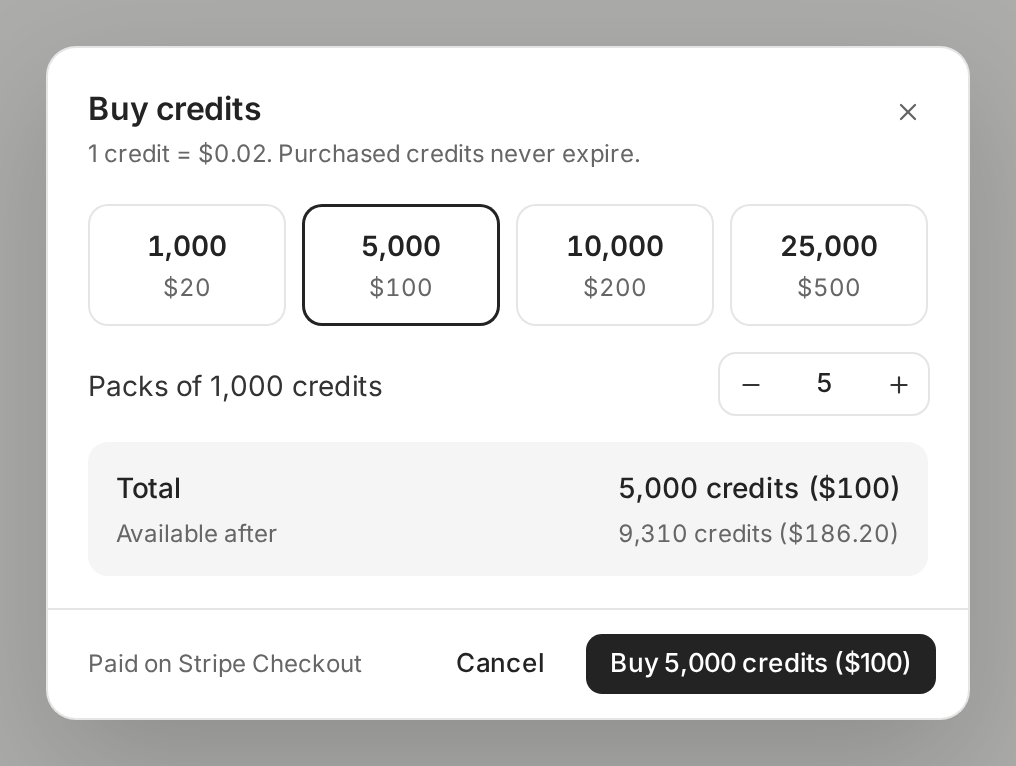
Total shows what you pay and what you will have available after. -
Check Total and Available after.
-
Click the Buy button. It names the amount, for example Buy 5,000 credits ($100). Stripe Checkout opens in a new tab.
-
Pay there. The credits arrive once Stripe confirms the payment. The dialog says "Stripe Checkout opened in a new tab". If your browser blocked the tab, click Open Stripe Checkout.
Turn on auto top-up
Auto top-up buys a pack for you when your available credits get low. Turn it on if you have Ken inboxes, so a renewal never fails.
- On the Billing page, find the Auto top-up card.
- Turn on the switch.
- In When available credits drop below, enter your threshold. The default is 1,000 credits.
- Pick how much to buy each time: 1,000 ($20), 5,000 ($100), 10,000 ($200) or 25,000 ($500).
Ken confirms with "Auto top-up is on". The card then says what Ken charges and when, for example "On. Charges Visa •••• 4242 when available credits drop below 1,000." Auto top-up charges at most 3 times in 24 hours, so a runaway workflow can't drain your card.
If something goes wrong
- "I don't see Buy credits." Your permissions don't include Billing and credits, so ask an admin. If Billing says "Your Ken team manages credits for this workspace", your Ken team adds credits for you. People on a client seat can't buy credits.
- "I paid but my balance didn't change." Credits arrive after Stripe confirms the payment. Reload the Billing page. A bank debit can take a few days to clear, and the credits arrive when it does. If a card payment still doesn't show, write to [email protected] with the time of the payment.
- "My included credits went down at the start of the month." Plan credits last for their own month and one more. Unused ones from two months ago expire. Purchased credits never do.
- "Ken says I'm out of credits, but my balance isn't zero." Your balance includes credits held for renewals. Only the available part pays for data and AI.
- "Research stopped halfway through a list." Credits ran out mid run. Add credits and Ken continues with the rest.
Next: Check what a run costs before you start, Get more from your credits or Use your own provider keys.