Before Ken starts work that costs credits, it shows an estimate with the credits the work should use and the credits you have available. The estimate charges nothing. Ken charges as the work runs, and many items cost credits only when they succeed.
Where you see an estimate
| Where | What the estimate covers | Typical cost |
|---|---|---|
| Accounts, Add | Research, signals and scoring, plus buying committee emails | About 18 credits per account |
| Workflows, Import leads | Qualification, one email and personalization for each lead | About 1.45 credits per lead |
| The campaign builder, at the top | The build itself | Free build once each billing month on Platform. After that, the chip shows the estimate, such as Build uses ~150 credits |
| Studio, Run on accounts | Page links, research and data steps, and writing | Depends on the template |
| Delivery, Buy Ken inboxes | Domains for the first year, inboxes for the first month, and prewarming | 200 credits per inbox a month, plus the domains |
| Delivery, connect a LinkedIn account | The first month of the account | 1,500 credits a month |
Workflows show the cost of each step too, and you can cap them with limits. See Set spend limits on workflows.
Read an estimate
Adding target accounts is the clearest example.
-
Open Accounts in the sidebar, or press G then A.
-
Click Add. The Add dream accounts dialog opens.
-
Paste or type the domains. The estimate under the field updates as you type.
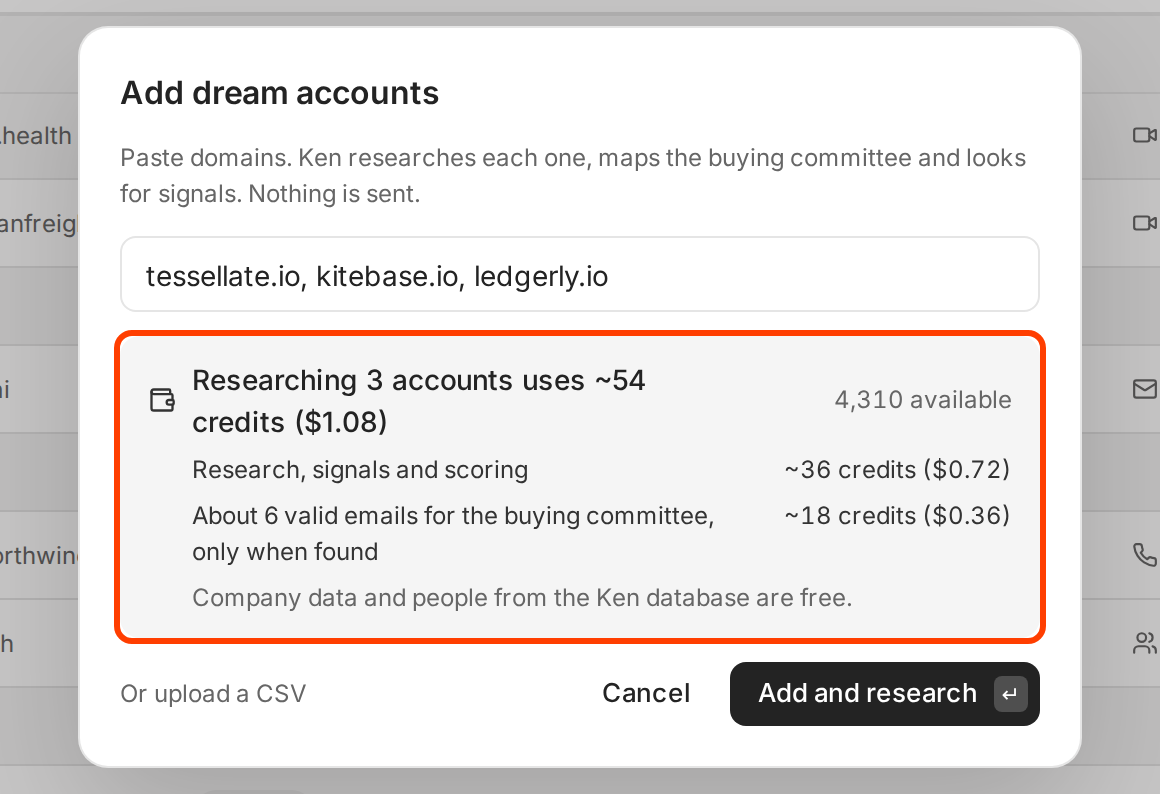
The estimate for three accounts, with what each part pays for. -
Read the top line. "Researching 3 accounts uses ~54 credits ($1.08)" is the total. The ~ means it is an estimate. On the right, 4,310 available is what you can spend right now.
-
Read the lines under it. Each one names a part of the work and its share of the total. "Only when found" means Ken charges for an email only when it finds a valid one.
-
Read the note at the bottom. It says what in this work is free. Here, company data and people from the Ken database cost nothing.
-
If the numbers look right, click Add and research. If not, remove some domains and watch the estimate drop.
Compare before you import leads
When you import leads from saved searches, the estimate changes with every search you pick. Ken drops anyone who shows up in more than one search, so two searches can cost less than their two counts added up.
-
Press G then W to open Workflows, click Import leads, then choose Search.
-
Tick a saved search on the Saved searches tab. The estimate appears below the list.
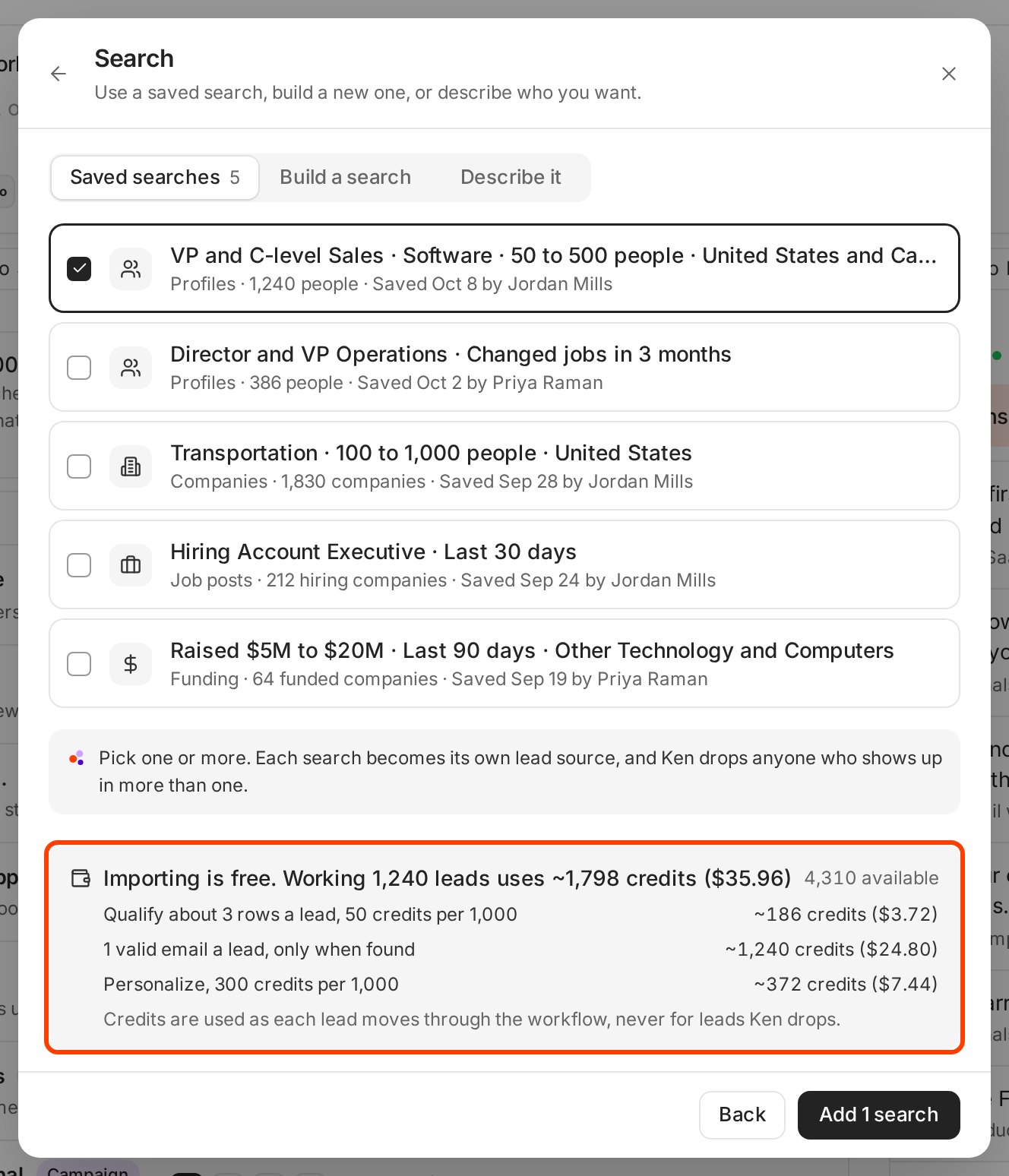
Importing is free. The estimate covers the work on each lead after import. -
Read the three lines. Qualification checks about 3 rows for every lead Ken keeps. Each kept lead gets 1 valid email when Ken finds one, and a personalized opener. The estimate counts every lead as kept, so these three steps usually cost less.
-
Tick or untick searches until the total fits your budget, then click Add 1 search. The button counts the searches you picked.
When the estimate is more than you have
If the work needs more than your available credits, the estimate says "You have" and your available credits, then "Work pauses when credits run out and picks up when you add more." You have three options.
- Click Buy credits in the estimate. The dialog opens with enough credits for the work. See How credits work.
- Make the run smaller, for example fewer accounts or one search instead of three.
- For accounts and leads, start anyway. Ken works until credits run out and picks up again when you add more. A Studio run needs the full amount before it starts.
If the workspace's credits are managed by your Ken team, the estimate says so instead of offering Buy credits.
Why the final cost can differ
An estimate uses typical numbers. What Ken charges follows what actually happens.
| The estimate assumes | What Ken actually charges |
|---|---|
| About 6 valid emails per account | 1 credit for each valid email found. A company with 4 findable people costs 4. |
| About 12 credits of research per account | The research that ran. A company with a lot to read costs more, a small one less. |
| Every lead goes through every step | Leads Ken drops pay only for qualification, 0.05 credits a row. |
| One email per lead | Nothing for leads with no valid email. |
| A typical campaign build | 100 credits per $1 of model cost for that build. |
| One publish per Studio page | 1 credit for each publish, so republishing a page costs 1 more. |
Email finding is charged only on success, and dropped leads cost little, so those parts come in at or under the estimate. Account research is the part that can run over.
See what a run cost
Every charge lands in Activity on the Billing page, one line per batch.
- Press G then ,, then click Billing.
- Scroll to Activity.
- Filter by Data, AI, Sending or Infrastructure, and pick This billing month, Last 30 days or All time.
- To check a big run line by line, click Export CSV.
If something goes wrong
- "Not enough credits." A Studio run needs more than your available credits, and the message shows both numbers. Buy credits or pick fewer accounts, then start again.
- "Estimating the credits…" doesn't go away. Close the dialog and open it again. If it keeps happening, write to [email protected] and name the dialog.
- "The final cost is higher than the estimate." Account research is billed on the work that ran. Open Activity on the Billing page to see each charge.
- "I don't see Buy credits in the estimate." You don't have the Billing and credits permission, or your Ken team manages credits for the workspace.
Next: Get more from your credits, How credits work or Set spend limits on workflows.