A signal is something that happened at a company that makes now a good moment to reach out, like a funding round or a reply. Ken adds up each account's recent signals into a score from 0 to 99, and the score sets the account's tier. Use both to decide which accounts to work today.
What counts as a signal
Ken checks every account for new signals once a day, starting at 5:00 a.m. US Eastern time. Ken skips accounts at the Paused or Not a fit stage. Replies, meetings and asset views come from your own outreach. Ken finds the rest in company data, job posts, people data and the news.
| Signal | What it means | Points | How Ken finds it | Adds a touch |
|---|---|---|---|---|
| Meeting | A meeting is booked | 30 | Your outreach | No |
| Reply | A reply from anyone on the committee | 25 | Your outreach | No |
| Leadership hire | A new VP Sales, VP RevOps, CRO or CFO in the last 180 days | 25 | People data | Yes |
| Asset view | An asset is viewed or forwarded | 20 | Your outreach | No |
| Funding | A new funding round | 20 | Funding round data | Yes |
| Hiring | Open sales or RevOps roles posted in the last 60 days | 15 | Job posts | Yes |
| Event | An exec speaks at an event | 15 | Not found on its own yet | Yes |
| Exec post | An exec posts about a pain you solve | 10 | Not found on its own yet | Yes |
| Tech change | Moves CRM or adds sales tools | 10 | Not found on its own yet | Yes |
| Job change | Someone on the committee moved to another company in the last 6 months | 10 | People data | No |
| Headcount growth | Headcount up 10% or more in a month | 10 | Company data | No |
| News | A news story about the company from the last 30 days | 5 | News search | No |
These are the default points.
- Ken does not look for Event, Exec post or Tech change on its own yet. You can still set their points in Scoring.
- Ken searches the news only for companies with more than 100 employees, at most once a day per account.
- Hiring and Leadership hire look for sales, RevOps and finance roles. If you sell to another team, lower their points.
- "Adds a touch" means the signal can make Ken add a touch about it to an account's active plan. Ken does that at most once per account every 7 days, and only for events from the last 14 days. The other signals only change the score.
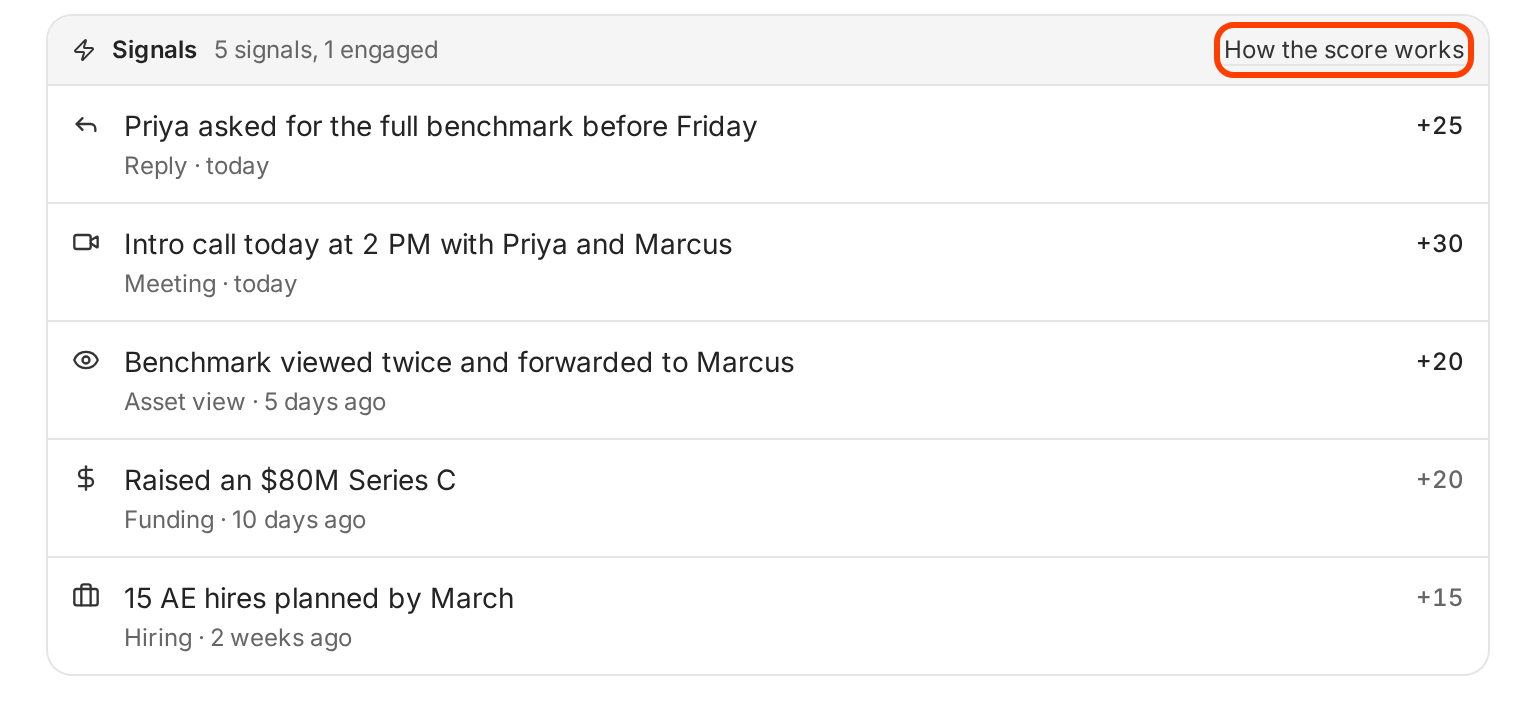
On an account page, the Signals card lists each signal with its points. Hover over the number to see how many points count now, like "Funding is worth 20; 12 toward the score now".
How the score is worked out
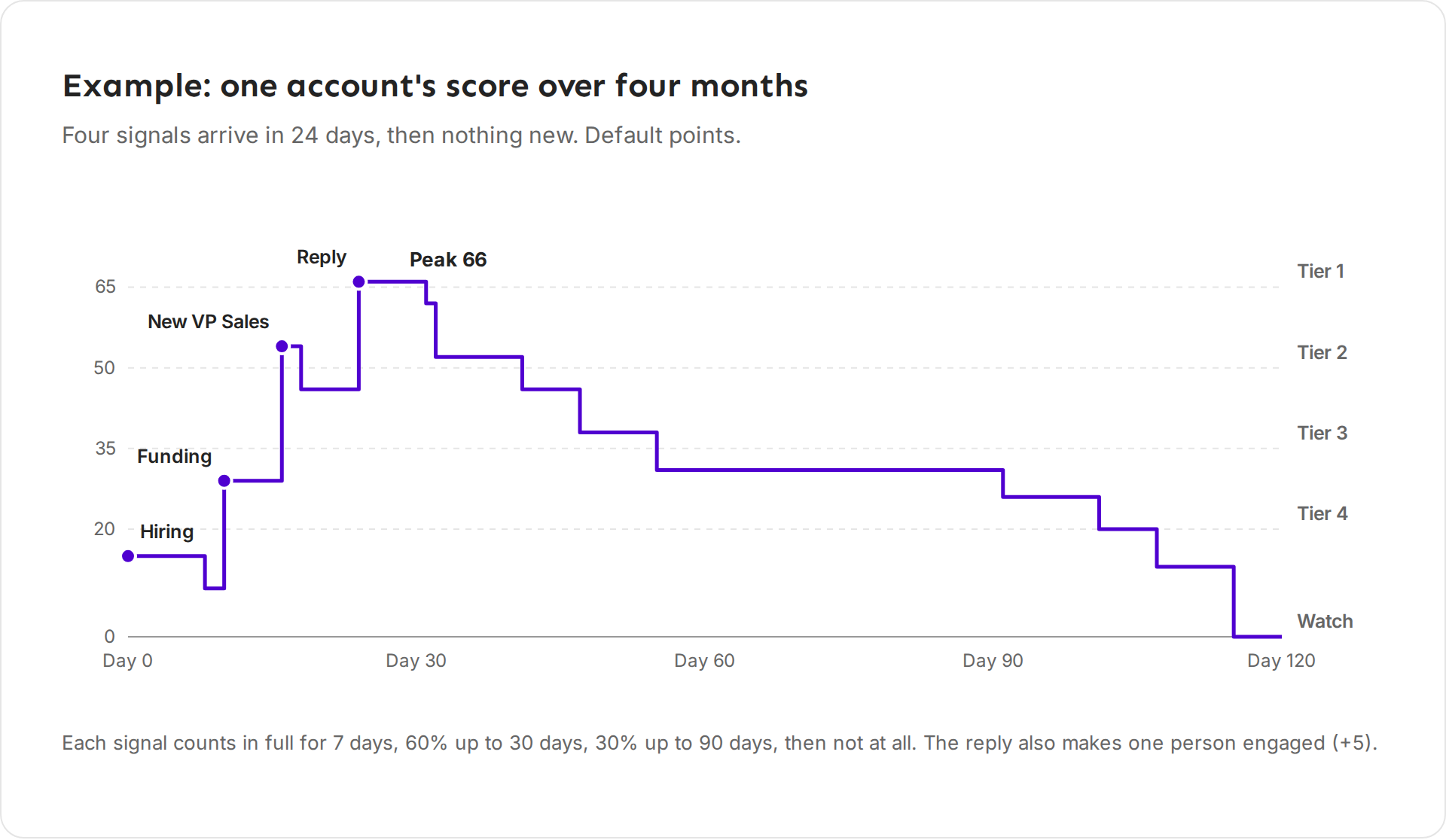
- For each type of signal, Ken takes the newest one from the last 90 days. Two funding rounds count once.
- Ken multiplies its points by how fresh it is: 100% up to 7 days old, 60% up to 30 days, 30% up to 90 days, and nothing after that.
- Ken adds 5 points for each engaged person, up to 4 people. An engaged person is someone on the committee marked Engaged, or someone who replied, met you or viewed an asset in the last 90 days.
- Ken rounds the total to a whole number. The score stops at 99.
Ken updates every score each day, so scores drop as signals age. When nothing new happens, an account fades to 0 after 90 days.
Example: Halcyon Health has a reply today (25), a meeting today (30), an asset view 5 days ago (20), a funding round 10 days ago (20 at 60% is 12) and hiring 2 weeks ago (15 at 60% is 9). That adds up to 96. One engaged person adds 5, which makes 101, so the score stops at 99.
How tiers work
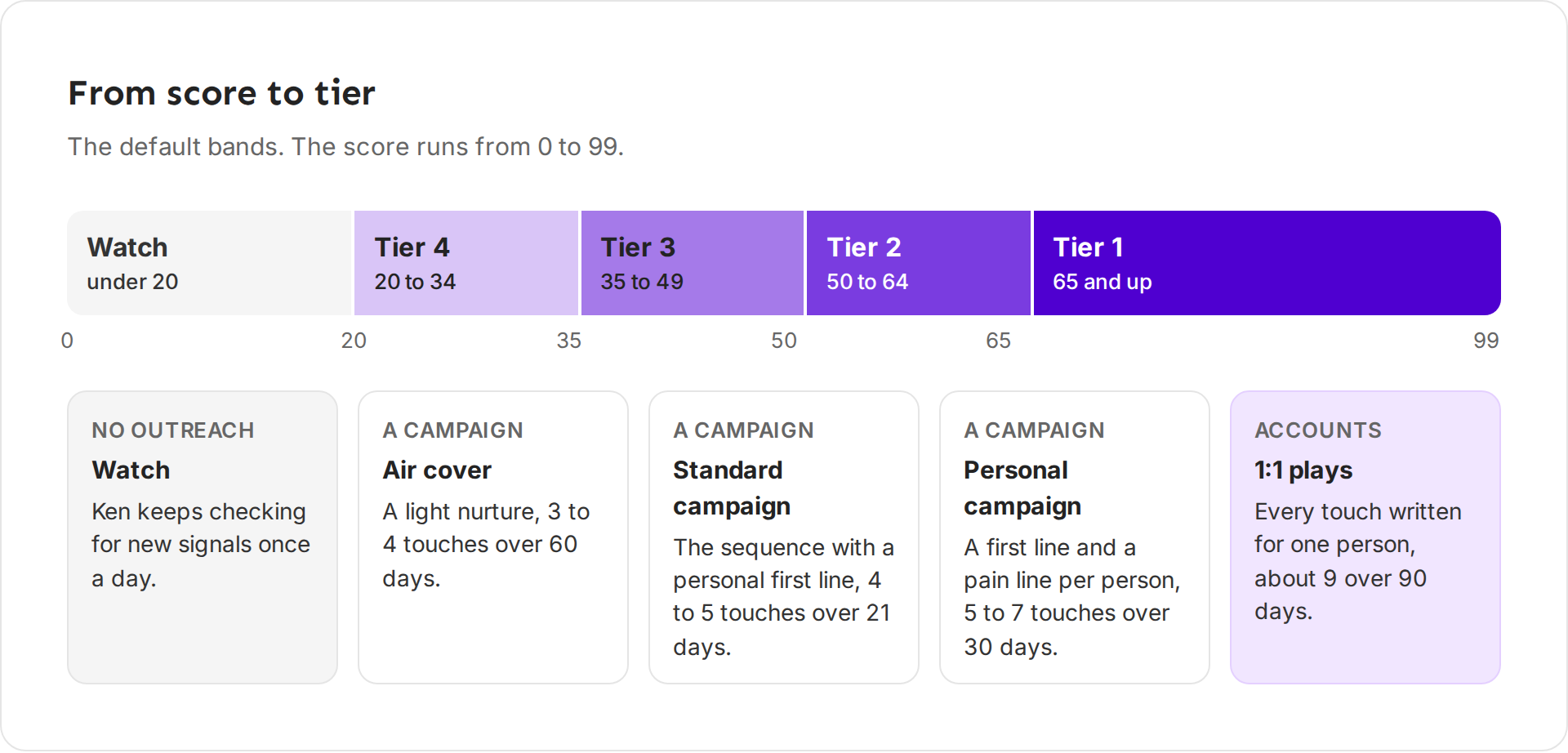
The score puts each account in a tier, and the tier decides where the account goes:
- Tier 1 stays in Accounts. Ken plans touches written for one person, and you approve each one.
- Tiers 2 to 4 send the account's people to a campaign you pick for that tier. The campaign's own steps decide the touches. Until you pick a campaign, these tiers act like Watch.
- Watch gets no outreach. Ken keeps checking for new signals once a day, and a new signal can move the account up.
| Tier | Score | Where it goes | Default plan |
|---|---|---|---|
| Tier 1, 1:1 plays | 65 and up | Accounts | About 9 touches over 90 days, each written for one person |
| Tier 2, Personal campaign | 50 to 64 | A campaign | 5 to 7 touches over 30 days |
| Tier 3, Standard campaign | 35 to 49 | A campaign | 4 to 5 touches over 21 days |
| Tier 4, Air cover | 20 to 34 | A campaign | 3 to 4 touches over 60 days |
| Watch | under 20 | Accounts, watch only | No outreach |
The tier shows next to the account's name, like "Tier 1 · 99". The Accounts list shortens it to "T1 · 99", and Watch shows as T5. To see the bands in your workspace, open Knowledge, then Tiers.
On the account page, the Tier field under Properties shows "Auto (Tier 1)" while Ken sets the tier from the score. A tier you pick there by hand isn't saved yet, so leave it on Auto. To change where accounts land, change the points in Scoring.
Change the points
Only Admins and Editors can change the points. For anyone else, a changed number goes back and Ken says why.
- Open Knowledge and click Scoring, or click How the score works on any account's Signals card.
- Under Points per signal, set each signal from 0 to 50.
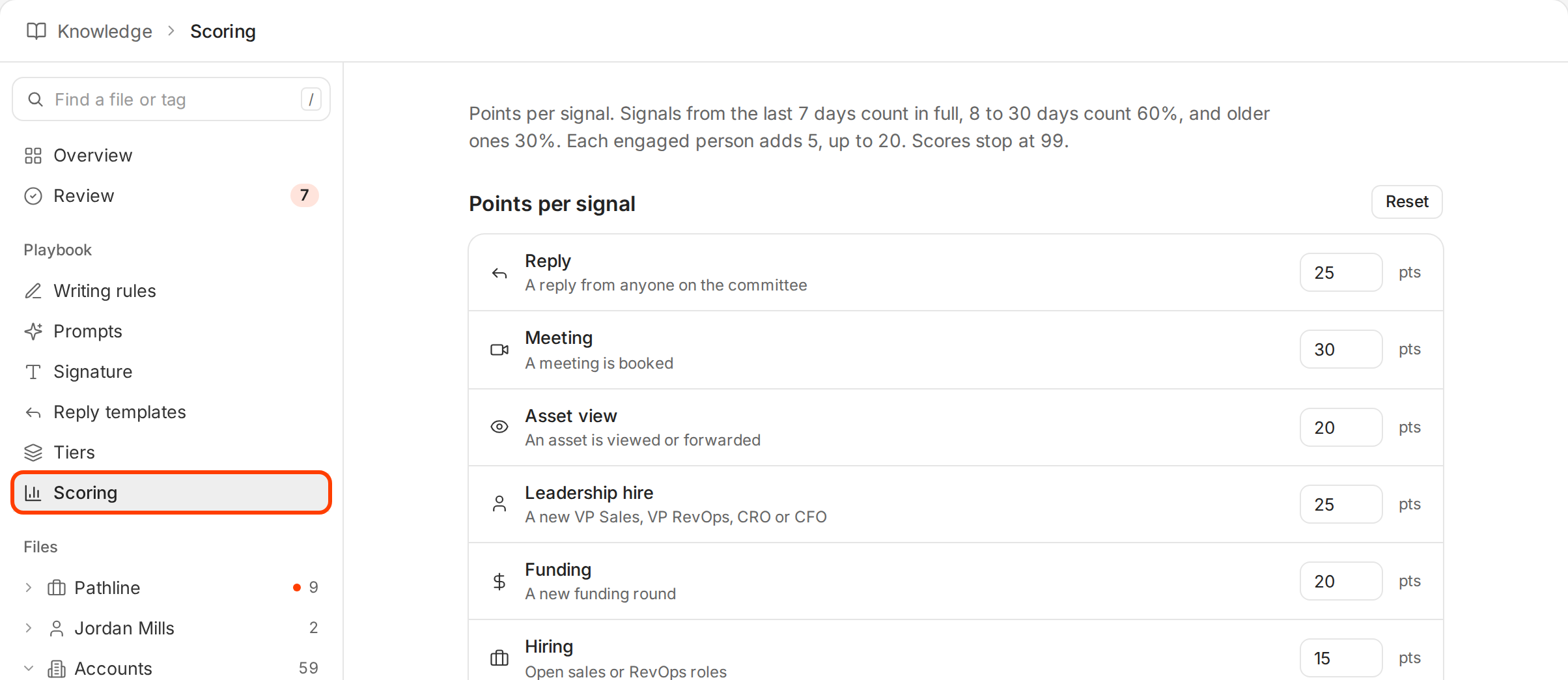
Ken scores every account again with the new points, so tiers can change across your list.
To go back to the defaults, click Reset. Reset puts both the points and the tiers back to the defaults, and Ken shows "Tiers and scoring reset to the defaults".
Decide who to work today
- Open Accounts and click the Heating up view. It lists accounts whose newest signal is from the past 7 days, while it still counts in full. Today shows the 4 of them with the highest scores.
- Start with Tier 1 accounts in that view, then Tier 2.
- Check Fresh signals for accounts with a funding round, a new leader or a job change in the last 90 days.
- Leave Watch accounts alone. Ken checks them once a day, and a new signal raises their score.
What works
- Act in the first week. A signal counts in full for 7 days, then drops to 60%.
- Match the touch to the signal. After a funding round, write about growth plans. After a leadership hire, write about the new leader's first months.
- Weight what predicts deals for you. If new sales leaders often buy from you, raise Leadership hire. If news rarely leads anywhere, leave it at 5 or set it to 0.
- Read the score, then read the brief. The score tells you who to look at. The brief tells you what to say. See Read an account.
If something goes wrong
- "The score went down, but nothing happened." Signals count less as they age. After 7 days a signal counts 60%, after 30 days 30%, and after 90 days nothing.
- "A signal is dimmed and adds nothing." It is older than 90 days, or its points are set to 0 in Scoring.
- "Two signals of the same type only count once." Ken counts the newest signal of each type.
- "The tier I picked went back to Auto." A tier set by hand isn't saved yet. Ken sets the tier from the score.
- "A new account has no signals yet." Ken checks each account once a day, so the first signals can take up to a day to show. Some companies have no recent signals at all, and they stay in Watch.
- "A company is in the news, but Ken shows no News signal." Ken searches the news only for companies with more than 100 employees, and only for stories from the last 30 days.
- "I can't change the points." Only Admins and Editors can. Ask one of them.
- "Scores changed across my whole list." Someone changed the points in Scoring. Click Reset to go back to the defaults.
Next: Hand off an account, Read an account or Choose the right target accounts.