Every reply tells you what to do next, once you know which kind it is. This playbook covers each kind: what it means, what to do in Ken, and a short answer you can adapt. Keep it open next to your Inbox for the first few weeks.
Start with Ken's label
Ken reads each reply and gives it a label: Interested, Objection, Wrong contact, Negative, Opt-out or Out of office. The label shows as a chip at the top of the thread. It decides which tab the reply sits in, so a wrong label can hide a reply from To Reply. A reply without a label waits in Other.
-
Open the reply in the Inbox.
-
Check the label chip under the subject.
-
If the label is wrong, click it, or press T, and pick the right one. The same menu adds your own tags, such as "Not now" or "Has a tool". Type a new name and pick Create to make one.
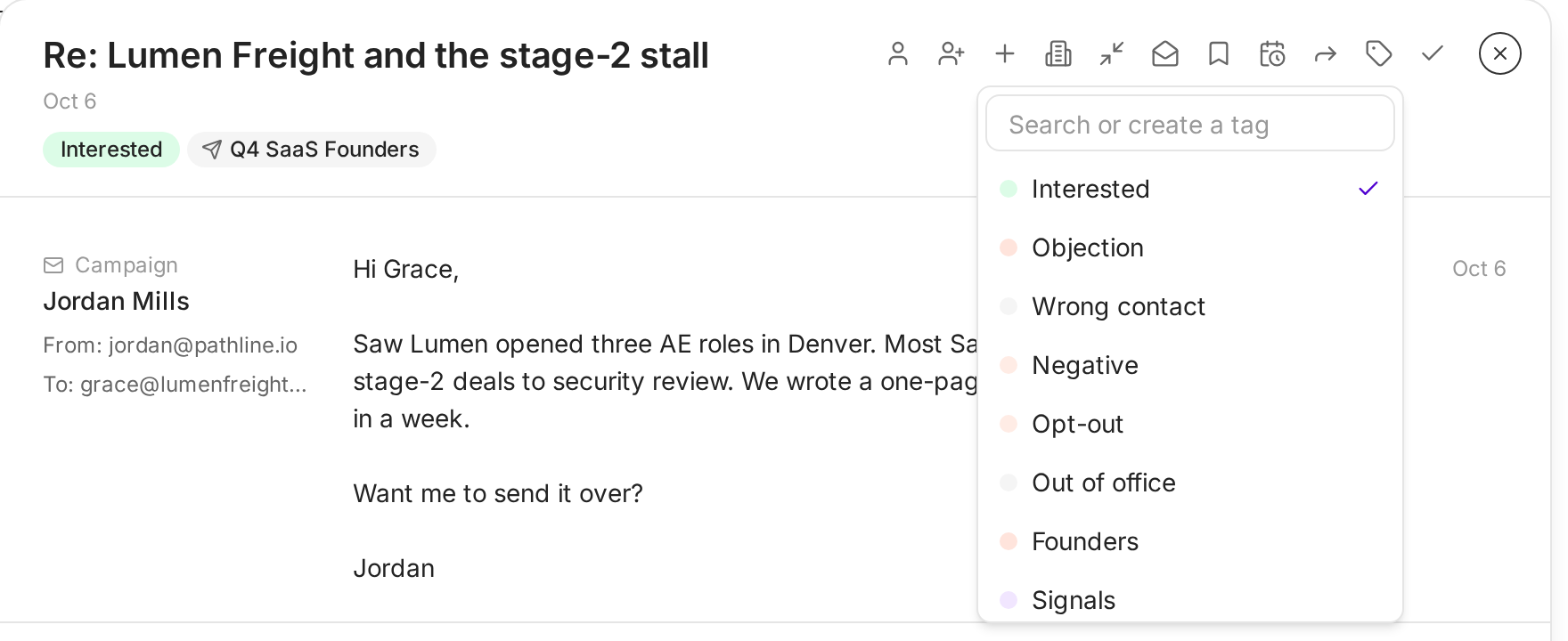
Labels come first in the menu, then your own tags.
By default, when someone replies, Ken stops their sequence in that campaign, so they get no more automatic follow-ups while you talk to them.
Which reply is which
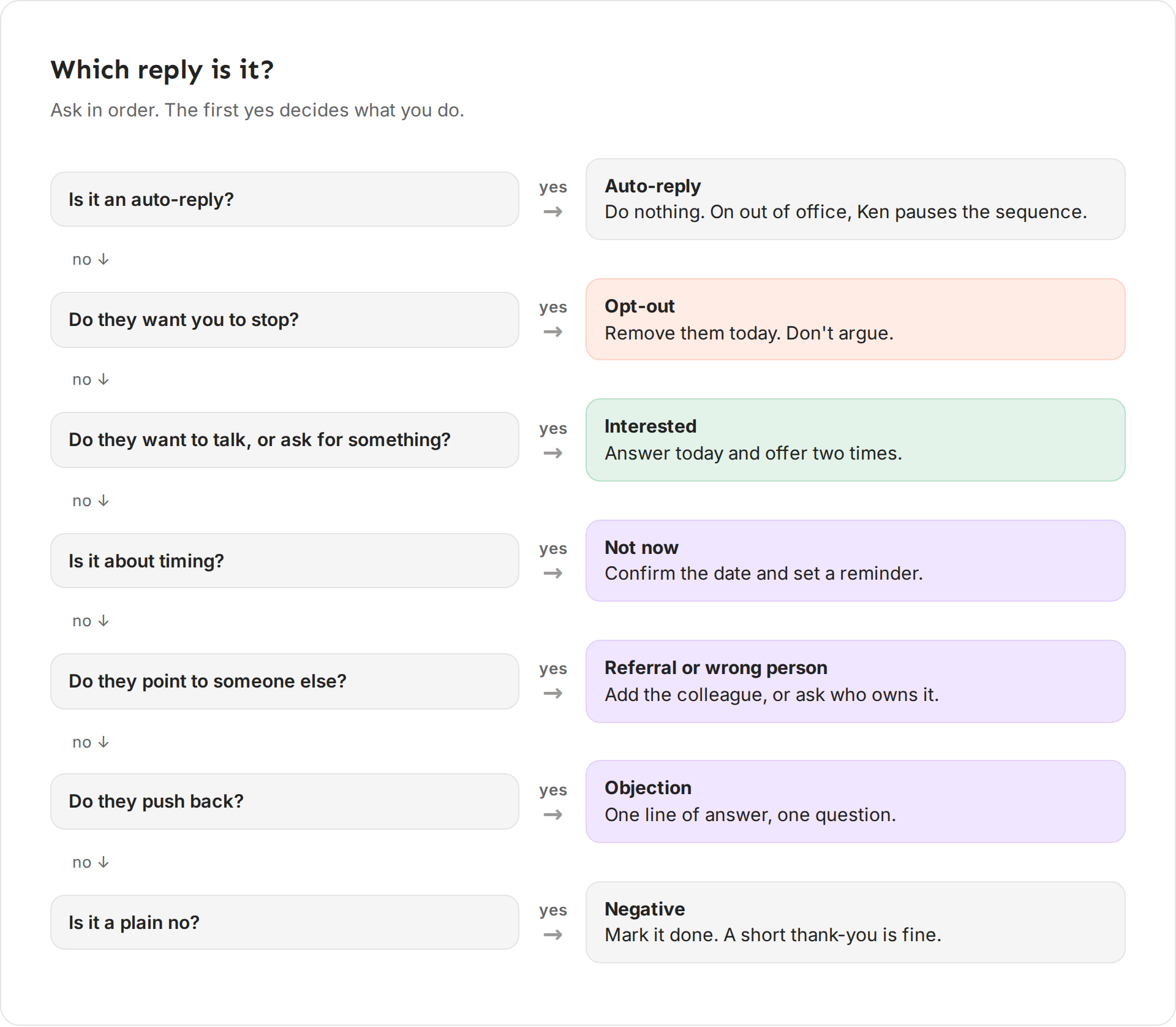
Ask these questions in order, and stop at the first yes:
- Is it an auto-reply? Ken files it in Automated. Do nothing.
- Do they want you to stop? It is an Opt-out. Remove them today.
- Do they want to talk, or did they ask for something? It is Interested. Answer today.
- Is it about timing? It is Not now. Set a reminder.
- Do they point to someone else? It is a referral or a wrong person. Reach the right one.
- Do they push back? It is an Objection. Answer in one line and ask one question.
- Is it a plain no? It is Negative. Mark it done.
What replies look like on Ken
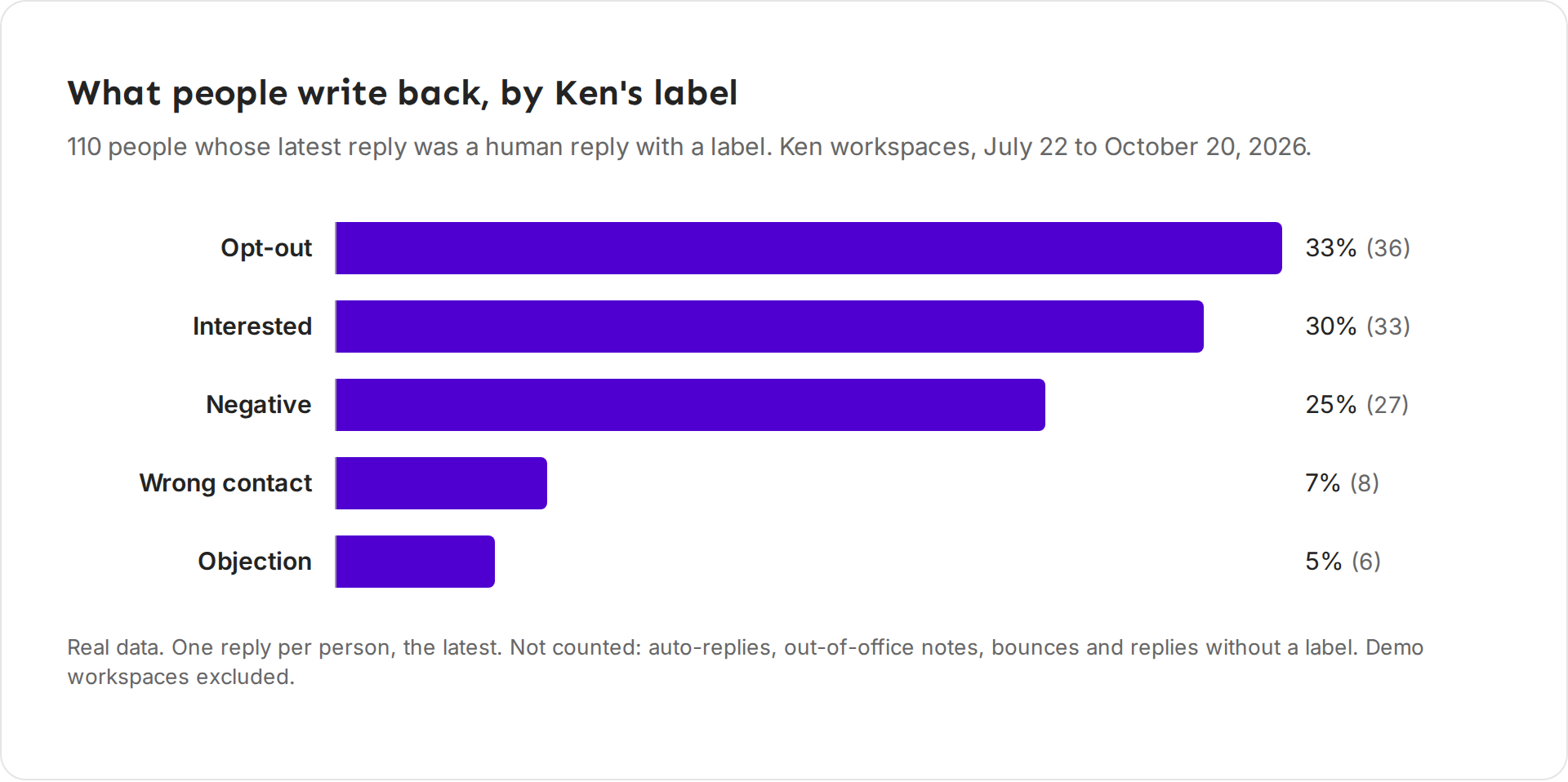
From July 22 to October 20, 2026, we counted 110 people across Ken workspaces whose latest reply was a human reply with a label. 36 asked to be removed (33%), 33 were interested (30%), 27 said no (25%), 8 pointed to someone else (7%), and 6 raised an objection (5%).
Two things follow. A third of human replies are removal requests, so handle them the same day. And interested replies come in about as often as a plain no, so read every reply before you judge a campaign.
The playbook
Interested
They want to talk, or they want what you offered.
Answer the same day. Propose two times, or ask a short question with your booking link on its own line. Mark the thread done (E) once the meeting is booked.
For example: "Thanks, Grace. Here is the checklist. Want to walk through two examples from teams your size? Tuesday 10 AM or Thursday 2 PM both work for me."
A question
They are interested enough to ask something, such as price, onboarding or how it works.
Answer the question in your first line, in one or two sentences. Then give one next step. If you need to check something, say when you will answer, and set a reminder for that day with Remind me later.
For example: "Marco, onboarding takes about two weeks, and your team spends about an hour of it. Want me to send the plan we use?"
Objection: price
They like it but worry about cost.
Don't dodge, and don't send a price list into a cold thread. Say in one line what the price depends on, then ask one question that tells you if the cost is worth discussing.
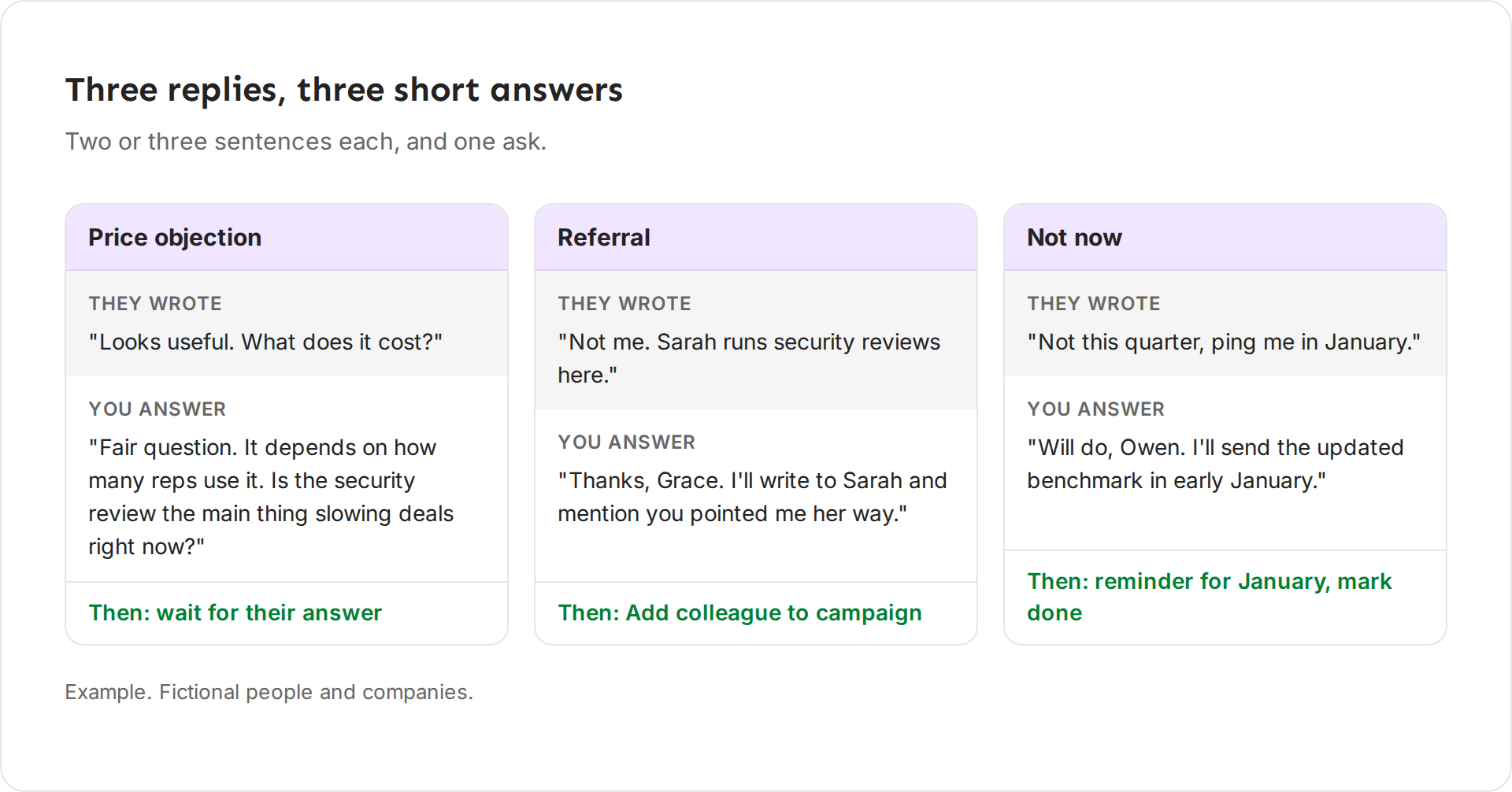
For example: "Fair question. It depends on how many reps use it. Is the security review the main thing slowing deals right now?"
Objection: "we already use something"
They have a tool or a vendor for this.
Don't argue with their choice. Say where you fit next to it, and offer one small, useful thing. Add a tag such as "Has a tool" so you can find these replies later.
For example: "Makes sense, Ethan. Most teams keep their tool and use our checklist only for the security step. Want me to send you the one-pager?"
Not now
Right person, wrong time: "Not this quarter, ping me in January."
Ken usually labels these Objection, so they stay in To Reply. Thank them, confirm when, then click Remind me later and pick the date. Then mark the thread done. The reminder brings it back to To Reply on the day. When the reply names a time, such as "next quarter" or "after the holidays", Ken sets the reminder for you.
For example: "Will do, Owen. I'll send the updated benchmark in early January."
People who said "not now" are your warmest list next quarter. Don't let the reminder slide.
Referral
They point you to the right person: "Talk to Sarah, she owns this."
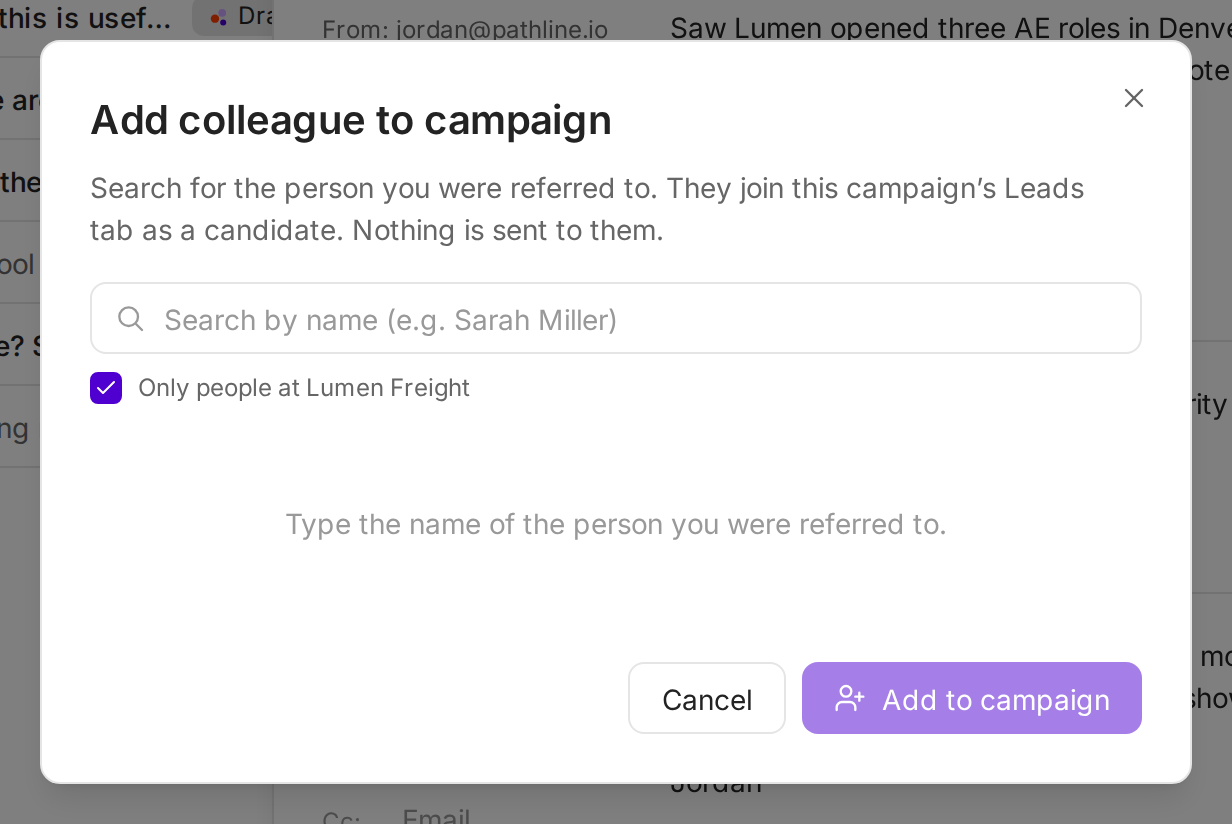
Thank them. Then click Add colleague to campaign in the thread toolbar, search for the person, and click Add to campaign. They join the campaign's Leads tab as a candidate, and nothing is sent to them yet. To start them in a different campaign, use Enroll in another campaign. Write to the colleague and name who sent you.
To the referrer, for example: "Thanks, Grace. I'll write to Sarah and mention you pointed me her way."
To the colleague, for example: "Hi Sarah, Grace suggested I reach out about security reviews on new deals. Is that on your plate this quarter?"
Wrong person
Not their job, and no name given.
Label it Wrong contact. Ask once who owns the topic, then mark the thread done. If they answer with a name, treat it as a referral.
For example: "Thanks for letting me know. Who looks after security reviews at Lumen Freight? I'll write to them instead."
Out of office
An auto-reply.
Do nothing. Ken labels it Out of office and pauses that person's sequence. It picks up again 2 days after the return date in the message, or after 7 days when there is no date. The thread shows the follow-up date, and the reply sits in Automated, not in To Reply.
If the auto-reply names someone to contact while they are away, treat that person as a referral.
Opt-out or angry
"Remove me", "stop emailing me", or an angry reply. Any request to be removed is an opt-out, even when it is polite or buried in a longer message.
When Ken is sure the reply is a removal request, it adds the person to your blocklist on its own. The reply waits in Not Interested. Check that the label reads Opt-out. If Ken missed it, change the label and add the address to your blocklist the same day. Then mark the thread done.
Don't argue and don't ask why. If you answer at all, one line is enough.
For example: "Understood, I've removed you. Sorry for the interruption."
A plain no
"Not interested."
Check that the label reads Negative, then mark the thread done. It stays findable in Not Interested. A short thank-you is fine. A second pitch is not.
Example answers
Tips from our team
- One reply, one next step. Each example above ends with one question or one date. Two asks compete.
- Keep labels right. The label decides the tab. A reply labeled Negative by mistake leaves To Reply and waits in Not Interested.
- Tag patterns. Tags like "Has a tool" or "Not now" show which objections come up most, and the Tags filter finds them later.
If something goes wrong
"Ken labeled a real reply as Out of office." Open it, press T and pick Interested, Objection or Wrong contact. The reply moves to To Reply. Ken keeps a label you set yourself.
"A reply is not in To Reply, Automated or Not Interested." Look in Other. Replies without a label wait there. Label them with T.
"I can't find the Add colleague button." It shows only on threads from a campaign.
"The person asked to be removed, but they are still in my campaign." Add the address to your blocklist now. If it keeps happening, write to [email protected] with the address and the campaign name.
Next: Sort and clear the Inbox, Snooze and remind or Reply from the Inbox.